

I tested Qwen 3.5 on my M1 Pro with 16 GB of RAM and my iPhone 17 Pro. Not as a benchmark. As a real tool I tried to actually use. Here’s what worked, what didn’t, and why I think local AI is closer than most people realize.
This week I ran a fully local AI model on my MacBook. Not as a curiosity. Not as a “let’s see what this is about” demo. I was genuinely trying to use it in my actual workflow, with my actual agent system, on real tasks I had to do.
The model was Qwen 3.5 at 9 billion parameters. My machine is an M1 Pro with 16 GB of RAM. Not a Mac Studio. Not a workstation. A regular laptop. Qwen 3.5 is a recent release and the smaller variants are what made this experiment worth trying now, not six months ago.
It worked.
Not “worked” in the sense that it launched without error. It worked in the sense that I sat there doing things with it and didn’t feel like I was fighting the hardware. It was slower than Claude. Obviously. But the slowness was within the range of acceptable. The kind of slowness where you are aware it exists, but you don’t feel punished by it.
That surprised me more than I expected.
Two Different “Local AI” Stories
Before getting into the experiment, there’s a distinction worth making because it gets collapsed into one thing constantly.
The first version of “local AI” is a local agent with a cloud model. All the code lives on your device. Your memory system, your automation scripts, your tool integrations. But the actual model is remote. You’re calling Claude or OpenAI from your laptop, but the architecture running the show is yours, on your hardware.
This is roughly what I do with Wiz. And it’s also why people started buying Mac Minis this year to host local agent frameworks. I wrote about this when OpenClaw went viral: the device is the cheap part. A base Mac Mini is around $599. The cloud model is what does the heavy thinking. You keep the orchestration local, private, and always on, without needing an always-on subscription tier or relying on someone else’s infrastructure for your automation.
The second version is a fully local LLM. The model itself lives on your device. No API calls. No cloud dependency. No data leaving your machine. For a long time this second path meant serious hardware, because the models worth running were large, and large meant expensive. You’d be looking at a very powerful Mac Studio or more to get something genuinely capable.
That calculus is starting to change.
The MacBook Experiment
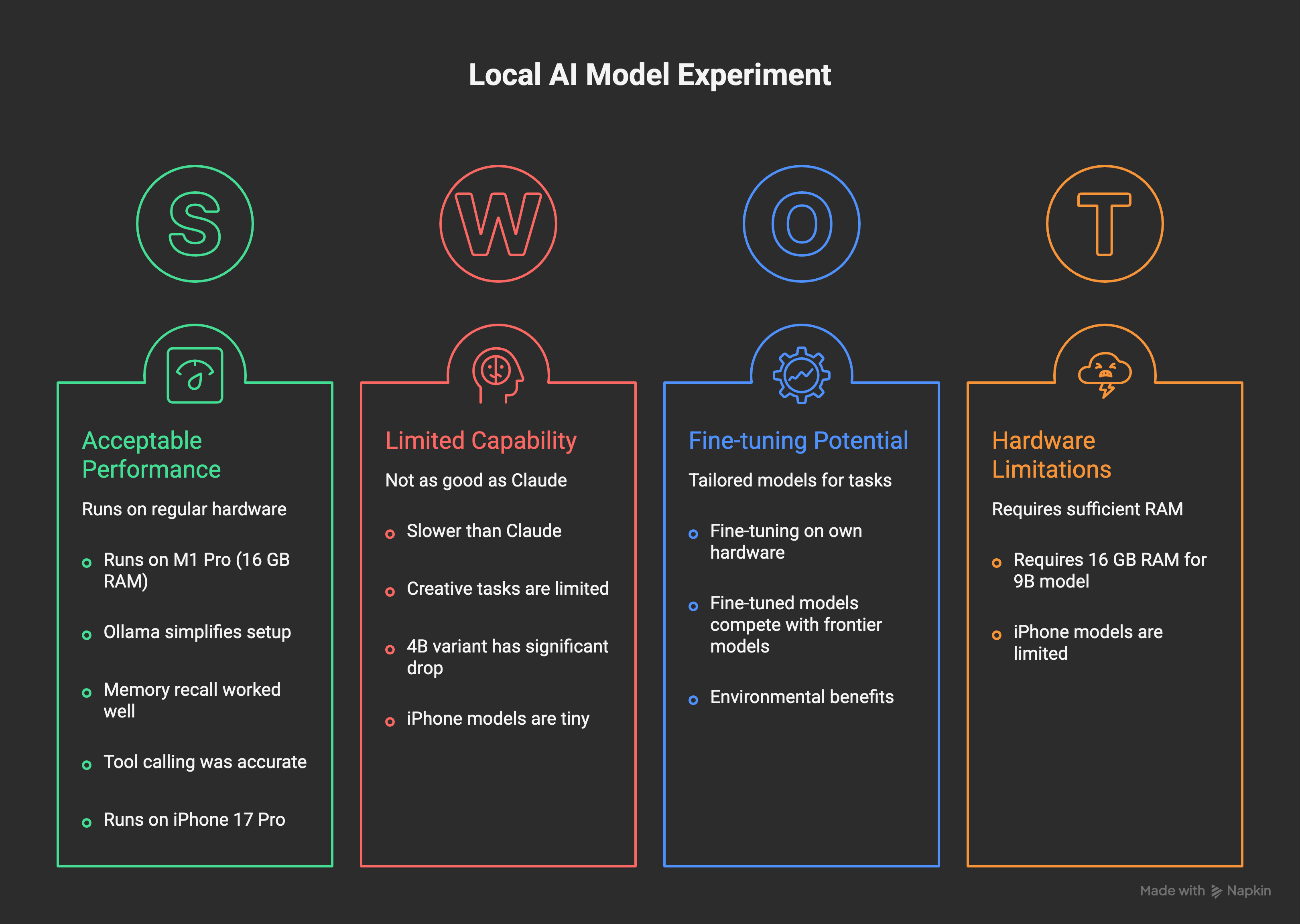
Qwen 3.5 at 9 billion parameters runs acceptably on 16 GB of RAM. That is the headline finding, and it’s a bigger deal than it sounds.
I used Ollama, which is effectively a one-command install that handles all the model management and gives you a local OpenAI-compatible API at localhost:11434. Any tool that supports OpenAI format can point at it. Including Claude Code, which is what I use as the interface for Wiz.
If you want to replicate this, it’s three commands:
# Install Ollama (or download from ollama.com)
brew install ollama

# Pull Qwen 3.5 — pick your size based on RAM
ollama pull qwen3.5:9b   # 16 GB RAM, my recommendation
ollama pull qwen3.5:4b   # 8 GB RAM, if you're tight on memory

# Run it
ollama run qwen3.5:9b
That’s it. Ollama starts a local server at localhost:11434 with an OpenAI-compatible API. If you use Claude Code, you can point it at Ollama by setting the base URL. Any tool built for the OpenAI API format just works. You’re now offline, no API key, no cost per token.

Since Wiz is built to be model-agnostic, switching to a local Ollama-served model was a configuration change. That’s it. One line. And then I was running tasks through my agent system with Qwen instead of Claude.

Here’s what actually happened:
Memory recall worked surprisingly well. I asked it to pull context from my memory files. It read them and surfaced relevant information with reasonable accuracy. The synthesis wasn’t Claude-level, but the information was retrieved and used correctly. For a task that is fundamentally “read a file, find the relevant bit, report it,” a 9B model handles that just fine.
Tool calling was interesting. Qwen could invoke the tools in my agent system with reasonable accuracy on straightforward requests. This matters more than raw text quality for agentic work. When you’re thinking about AI cost optimization, the model that can call the right tool at the right time is often more valuable than the model that writes the most beautiful prose.
Creative tasks and complex reasoning? Not the same. When I asked for writing help, analysis, or anything requiring real synthesis, the quality gap was noticeable. This is not a criticism. It’s just an honest observation about what a 9B model is and what it isn’t. I also tried the 4B variant, and as you’d expect, the capability drop was significant. The 9B is where I’d draw the usability line for my type of work.
The important framing here: this is not about comparing Qwen to Claude Opus. They are not in the same category. It’s about whether a local model can handle a real subset of the work I do, and the answer is yes. A real, non-trivial subset.
There’s also a path I haven’t explored yet but that interests me: fine-tuning. You can fine-tune a 4B or 9B model on your own hardware. Feed it your writing, your preferences, your terminology, your style. Get something more tailored than any off-the-shelf model. This is possible on a MacBook. It takes time, but it’s not a theoretical exercise. For specific, personal tasks where you know exactly what you want the model to do, a fine-tuned small model might outperform a general-purpose larger one.
The iPhone Experiment
The iPhone experiment was more for curiosity than immediate utility. But it ended up being the part that surprised me most.
The app I used is called PocketPal AI (free on the App Store). It’s an open-source app that lets you download and run language models directly on your iPhone, completely locally. You browse models from Hugging Face, download them over Wi-Fi once, and then run them with no internet required. The simplest way to verify this is working: enable airplane mode, then ask the model something. It responds. Nothing left your phone.
I ran Qwen at 0.8 billion and 2 billion parameters on my iPhone 17 Pro. Setup is simple:
Install PocketPal AI from the App Store
Open the app, go to the model browser
Search for Qwen and download a small variant (0.5B or 1.5B for older phones, 2B for newer ones like the 17 Pro)
Start chatting, then turn on airplane mode to confirm it’s fully local
The obvious question was not “is this as good as Claude” but simply “can you fit something locally useful onto a phone at all?” The answer is yes, but with clear limits. These are tiny models. They handle basic text tasks and short question-answering with reasonable quality. They are not going to help you build an app overnight. But they run. Fully on the device. Entirely locally.
The most interesting implication here isn’t the model capability. It’s the hardware signal. An iPhone running a local LLM in 2026 means smartphones are now powerful enough to do this. That’s meaningful. Not because the 0.8B model is impressive, but because the hardware that’s already in your pocket has crossed a threshold.
The privacy angle is also real. When nothing leaves your device, you don’t have to think about what you’re sending where. No terms of service governing your queries. No API logs. Just you and the weights running on your silicon. I’ve been thinking about this since I lost access to six months of voice data when a cloud AI service got banned in the EU. Local is a different kind of resilience.
The Cost Angle
Here’s the practical reason this matters beyond the technical interest: AI subscriptions add up fast when you’re running a lot of agent tasks. This isn’t hypothetical. I track my usage closely.
Not every task requires Opus. A lot of agent work is genuinely simple: read a file, format something, summarize a short note, answer a factual question from context. Routing those tasks to a local model instead of a frontier model changes the math considerably.
I’ve written before about switching from Opus to Haiku for simpler agent tasks. The principle is the same: match the model to the task complexity. Local models are just the extreme end of that spectrum. Free at the marginal level, private by default, always available without a network call.
The next version of Haiku is something I’m watching closely. It keeps getting better and the cost keeps dropping. Local models are following the same trajectory, just at a different layer.
Where This Goes
I think the future of AI involves a lot more local compute than the current conversation suggests.
The shape I see: cloud models for the hard stuff. Complex reasoning, creative work, architectural decisions, things that require real direction and vision. But for the hundreds of small cognitive tasks that happen in an agent system every day, local models will get good enough that routing makes sense.
The hardware argument is important here too. Look at the last four years of consumer silicon. M1, M2, M3, M4, M5. Each generation meaningfully faster and more memory-efficient than the last. The trajectory on both sides, better models and better hardware, is pointing toward the same place. A few years from now, the laptops people already own will run models that feel noticeably more capable than what I ran this week.
My rough prediction: in three years, there will be local models fine-tuned to specific use cases that genuinely compete with today’s frontier models on those specific tasks. Not on general reasoning. Not on creative synthesis. But on “do this specific thing I care about, quickly, privately, without an internet connection.” That’s a very real and useful category.
There’s also an environmental angle that doesn’t get discussed enough. The energy and infrastructure cost of a query hitting a data center is orders of magnitude higher than the same inference running on local silicon. If most routine AI tasks shift to local, the resource equation changes. Not solved, but meaningfully different.
Right now the tradeoffs are clear: local models are limited, fine-tuning requires effort, and the capability gap with frontier models is real. But the direction of travel is not ambiguous. The gap is closing. I tested it this week on hardware I’ve had for years, and it worked well enough to make me think about where I route tasks.
If you’re curious: install Ollama, pull Qwen 3.5 at 9B, and try something simple in your workflow. The experience is different from running a benchmark. It’s surprisingly real.
Cool experiment :). I am ready to try on my Mac. But I will wait a bit for iPhone, hope it will not make the battery explode @@
Cool experiment Pawel. I think small models for specific tasks are the future too. Right now power consumption is the main detractor, as it's way easier to connect via api online.