


A few weeks ago I wrote about running Qwen on my MacBook and iPhone. That was the first experiment. Local models doing real work on normal hardware. The gap between local and cloud was closing fast, and I wanted to push it further.
So I did. I moved everything to a headless Mac Mini M4, the base $599 model with 16GB of RAM. Started with smaller Qwen models for message classification and context compression. Then I found a way to run a 35 billion parameter model on 16 gigs. 17 tokens per second. Zero swap. Everyone said you need 32GB minimum. I’ve been running it for about a week now.
Yesterday Google dropped Gemma 4 under Apache 2.0. Within hours I benchmarked it against my Qwen setup. Classification went from 8.5 seconds to 1.9 seconds. By evening the swap was done. Five files changed.
This is all of it. How I fit a 35B model on a $600 machine, what local models actually do when you’re running an AI agent 24/7 (spoiler: it’s way more than classification), how model routing works across three tiers, and why Gemma 4 made me swap the brain overnight.
Why I Needed Local AI (It’s More Than You’d Think)
My Mac Mini runs as a headless AI automation server. iMessages, emails, scheduled nightshift tasks, 35+ specialized skills. The brain is Claude Code. Claude is brilliant. Claude also has usage limits.
I pay for Claude Max. It’s not cheap. And every wake-up burns through that subscription. I needed a way to handle the routine work locally. Free. On the machine itself.
At first I thought this would just be message classification. Is this a question or a greeting? Route the boring stuff away from Claude. That’s how it started.
Turns out that was maybe 20% of what local models can do. Here’s what actually runs locally now:
Message triage: classifying every incoming message (question, request, idea, greeting, FYI) and assessing urgency. Under 2 seconds per message.
Context compression: when someone sends a 500-word message, the local model compresses it to 30 words before Claude sees it. Same understanding, fewer tokens.
Signal compression: my agent collects signals all day long (errors, metrics, task outcomes, all kinds of stuff). Before the nightshift planning session, the 35B compresses the entire day into a dense summary. Saves roughly 15x in tokens for the Opus planning call. That’s a lot of money over a month.
Email preprocessing: same triage pattern applied to incoming emails before deciding whether to spin up a full Claude session.
Memory consolidation: the agent accumulates daily notes and context. A local model clusters related entries and merges them. Like defragmenting a hard drive, but for the agent’s memory.
Fallback: when Claude is rate-limited or down at 3am, the local 35B handles operational tasks. Not Claude-level reasoning, but functional.
The triage classification is just one example. The local models touch nearly everything the agent does. The result: roughly 30-40% fewer Claude sessions compared to routing everything through the API. My subscription lasts longer. And the agent responds faster for routine work because there’s no network round-trip.
Three Tiers, One $600 Machine
Not every task needs the same model. Like, classifying “is this a question or just ok?” is a completely different thing than compressing an entire day of automation signals into a planning summary. So I built a routing system. Three local tiers plus the cloud.
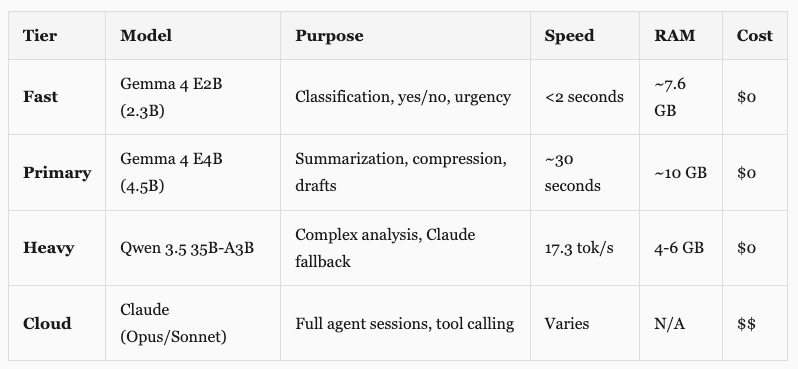
Why three tiers and not just one? A 2B model can tell you whether “What’s the status?” is a question or a greeting. But it can’t produce a useful 30-word summary of a 500-word message. And neither the 2B nor the 4.5B can do what the 35B does: compress an entire day of signals into a dense planning brief, or serve as a real fallback when Claude goes down. Different tools for different jobs.
The fast tier runs on every incoming message. Classifies the type (question, request, idea, greeting, FYI), assesses urgency. Under 2 seconds. If the message is a greeting or pure FYI, the agent skips Claude entirely. This one needs to be fast because it runs on every single message, all day.
The primary tier handles tasks where you need actual language understanding. Context compression is the main one: someone sends a long message, this model condenses it to 30 words before Claude sees it. It also handles things like Substack Notes generation as a fallback and the morning report AI summary. The 2.3B fast model can’t produce quality summaries. The 35B is overkill for this. The 4.5B sits in the sweet spot.
The heavy tier is where it gets interesting. The 35B does two things. It handles complex preprocessing (compressing the day’s automation signals before the nightshift Opus planning call, which saves roughly 15x in tokens). And it sits in the resilience chain as a Claude fallback. When Claude is rate-limited at 4am, the 35B handles health checks, error scanning, operational maintenance. Always marked as “[Local Fallback]” so I see the difference in the morning. But something functional beats nothing at 3am.
The triage routing for messages looks like this:
1. Incoming message hits triage
2. Fast tier classifies (question/request/idea/greeting/fyi) + urgency
3. If greeting or fyi: skip Claude entirely
4. If long text: primary or heavy tier summarizes before Claude sees it
5. Prepend classification to Claude's prompt: "[Pre-classified: request, urgency: high]"
6. Claude skips its own analysis step = fewer tokens burned
But message triage is just the entry point. The same models handle signal compression, email preprocessing, memory consolidation, fallback responses. The routing system is the foundation. The use cases keep growing, and that’s kind of the point.
Safety rules still matter. Messages mentioning money, deployment, publishing, or anything work-related always bypass local triage and go straight to Claude. Very short messages (under 20 characters) also skip triage because “yes” could be a standalone acknowledgment or an answer to a previous question. I learned that one the hard way when the triage classified “yes” as acknowledgment and skipped a real conversation reply.
The 35B Trick (Your SSD Is the New GPU Memory)
This is the part that shouldn’t work. I didn’t invent this. I came across a post on X where someone was running oversized models on consumer hardware using a specific flag in llama.cpp. That sent me down a rabbit hole.
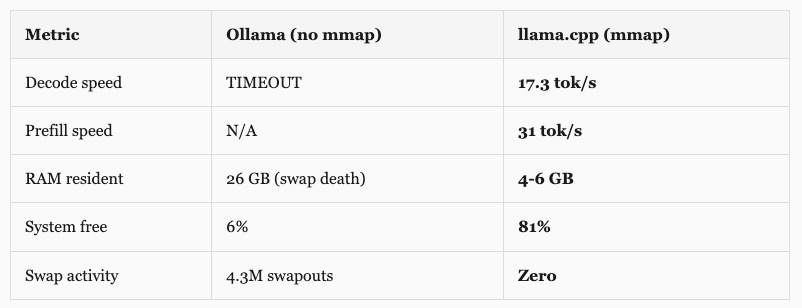
Qwen 3.5 35B-A3B has 35 billion parameters. At standard precision, that’s way more than 16GB. My first attempt through Ollama loaded 26GB into memory on a 16GB machine. The system froze. 4.3 million swapouts. Timed out after 10 minutes without producing a single token. Dead.
Then I tried llama.cpp with one flag: --mmap.
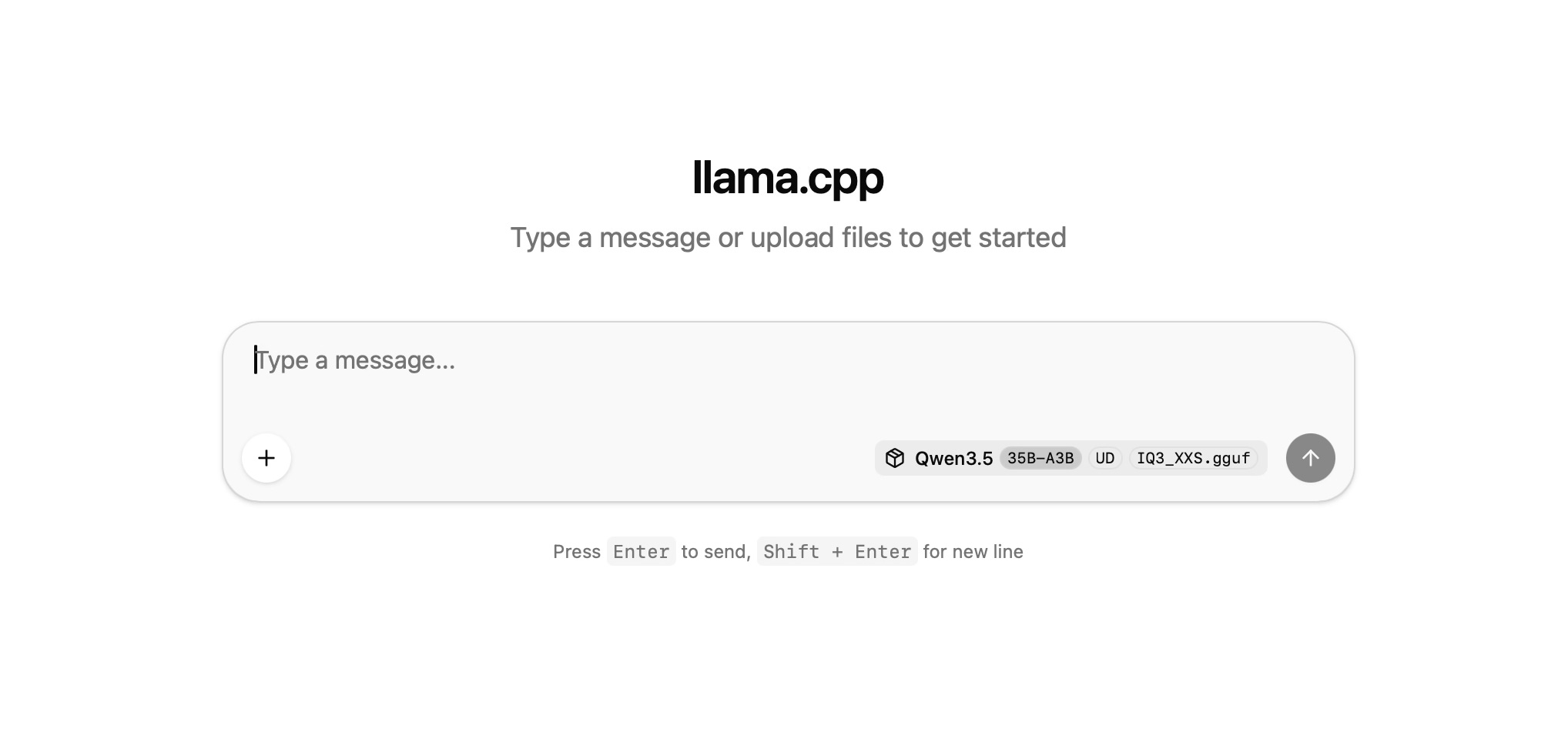
Same model. Same hardware. Same 16GB. Result: 17.3 tokens per second, 81% memory free, zero swap.
Why This Works
Two things make this possible: the model architecture and how macOS handles files.
Qwen 3.5 35B-A3B is a Mixture of Experts (MoE) model. 35 billion parameters total, but only 3 billion are active per token. Like a building with 35 floors where any given task only needs to visit 3 of them. The rest sit empty. A router network inside the model decides which experts to activate for each token.
So what does --mmap do? Instead of loading the entire model file into RAM (which is what Ollama tried, and why it choked), llama.cpp memory-maps the file. The OS treats the model like a virtual address space backed by your SSD. It only pages in the weights that are actually needed:
Shared layers (attention, embeddings, norms): stay resident in RAM, about 4-6 GB
Expert weights: paged from SSD only when that expert activates
90% of the model sits on your NVMe drive, untouched most of the time
The macOS page cache naturally caches recently used experts, so repeated patterns get faster
None of this is new, by the way. Apple published a research paper called “LLM in a Flash” back in December 2023 describing exactly this approach: use your SSD as an extension of available memory for LLM inference. The M4’s unified memory architecture helps too (no PCIe bottleneck between CPU and GPU memory, it’s all one shared pool). And the NVMe SSD in the Mac Mini is fast enough that paging weights on demand doesn’t bottleneck inference for MoE models where most weights are idle anyway.
The thing that actually surprised me? The 35B is faster than the old 9B model. 17.3 vs 12.6 tok/s decode. Even though it has 4x more total parameters, MoE means each token only computes through 3B parameters. Better quality weights, same compute budget. Bigger model, less work per token. I did not expect that.
I downloaded an aggressively quantized version (Unsloth’s UD-IQ3_XXS, 13GB on disk) and run it on llama.cpp alongside Ollama on a different port. Ollama handles the fast and primary tiers on port 11434. llama.cpp handles the heavy tier on port 8081. Both coexist on the same machine. Total disk for everything: about 22GB.
The Brain Swap (Qwen to Gemma)
For about a week, everything ran on Qwen 3.5 across all tiers. It worked. Classification took about 8-9 seconds on the 4B model, summarization around 50 seconds on the 9B. Not blazing, but good enough for background preprocessing that doesn’t need instant responses. The system was stable. I was happy with it.
Then yesterday, Google released Gemma 4.
Apache 2.0 license. That matters. Previous Gemma versions had usage restrictions and monthly active user limits. For something running 24/7 as production infrastructure, license restrictions are a real concern. Apache 2.0 means no strings.
The benchmarks were wild. Gemma 4’s models scored 88-89% on AIME 2026 math. The previous Gemma 3 scored 20.8%. That’s not incremental improvement. That’s a different model family wearing the same name.
But the thing that really got me: multimodal on small models. The E2B (2.3B effective) and E4B (4.5B effective) can process images and audio natively. My Qwen setup was text-only. Voice messages via iMessage? Had to skip them entirely. Screenshots sent for context? Invisible to the triage layer. With Gemma 4, that changes. That’s a real capability gap closed, not just a speed improvement.
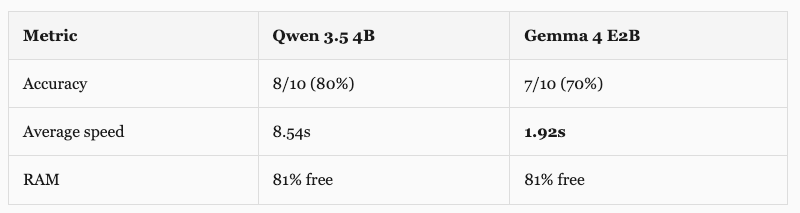
I wasn’t going to swap production models based on a marketing page though. Wrote a benchmark script, ran 10 classification prompts and 3 summarization tasks against each model under identical conditions.
Classification (10 test messages)
Summarization (3 test texts)
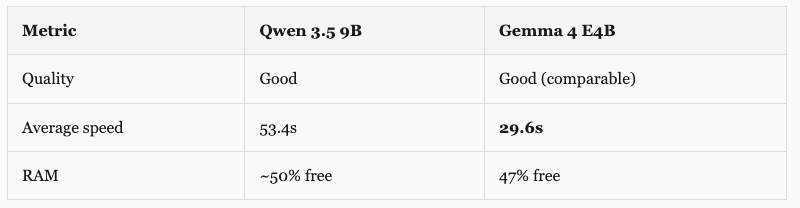
4.4x faster classification. 1.8x faster summarization. The speed difference is what sold me. For a triage system that runs on every incoming message, 1.9 seconds vs 8.5 seconds is the difference between “barely noticeable” and “why is this taking so long.”
The accuracy gap (70% vs 80%) turned out to be mostly gray areas. Both models classified “What’s the status of the nightshift?” as status_check instead of question. Honestly, status_check is a better answer. One genuine miss: Gemma said “observation” for a message where “fyi” would’ve been correct. It invented a category that wasn’t in the allowed list. Edge case I can fix with better prompting.
The actual swap was anticlimactic. My architecture centralizes model names in one file. Two constants changed, three files with hardcoded model strings updated. Done.
# automation/lib/local_llm.py
MODEL_PRIMARY = "gemma4:e4b"   # was "qwen3.5:9b"
MODEL_FAST = "gemma4:e2b"      # was "qwen3.5:4b"
The heavy tier stays on Qwen 35B via llama.cpp. Deliberately. The fast and primary tiers run through Ollama, which had Gemma 4 support on day one (I upgraded Ollama from 0.19 to 0.20 for it). The heavy tier runs through llama.cpp with the mmap trick. Swapping that to Gemma’s 26B MoE variant means testing a different quantization, different mmap behavior, different inference characteristics. I don’t change two things at once in production infrastructure. Qwen 35B works. It stays until I’ve properly benchmarked the Gemma 26B alternative.
Old Qwen models stay on disk as rollback. If anything breaks, reverting the fast and primary tiers is a two-line change.
The Thinking Mode Trap
Both Qwen and Gemma have a “thinking” mode. The model generates an extensive chain-of-thought before answering. For complex analysis, this is great. For classification, it’s a disaster.
With thinking enabled, a simple “is this message a question or a request?” took 30+ seconds. The model generated 500 tokens of internal reasoning (”Let me analyze the intent of this message. The user is asking about...”) and then said “request.” All that thinking for a one-word answer. I was watching this happen in real time and just... no.
One parameter: think: false in the Ollama API call. Classification went from 30 seconds to under 1 second. Same accuracy. 30x faster. This was the single biggest optimization in the whole setup, and I almost missed it.
Works the same way for both Qwen and Gemma:
# Qwen classification (fast, thinking disabled)
curl localhost:11434/api/chat -d '{
  "model": "qwen3.5:4b",
  "messages": [{"role": "user", "content": "Classify: question/request/greeting"}],
  "think": false,
  "options": {"num_ctx": 4096}
}'

# Gemma classification (same API, same parameter)
curl localhost:11434/api/chat -d '{
  "model": "gemma4:e2b",
  "messages": [{"role": "user", "content": "Classify: question/request/greeting"}],
  "think": false,
  "options": {"num_ctx": 4096}
}'
Same parameter, same behavior, no code changes when I swapped models. For the heavy tier (llama.cpp on port 8081), thinking is controlled via the system prompt instead, but same principle: disable it for fast tasks, enable it when you actually need reasoning.
People asked about context windows on my first local LLM post. Fair question. I push them as far as the hardware allows. Classification gets 4K (it doesn’t need more, most messages are under 200 tokens). Summarization gets 32K on the primary tier. Document analysis gets up to 64K on the fast tier. The heavy 35B gets 16K, which is enough for compressing a full day of signals or handling a long fallback conversation. The mmap trick handles the model weights, but the KV cache (the memory the model uses to “remember” the conversation) still lives in RAM. With the model weights at 4-6 GB and the KV cache for 16K context, there’s still plenty of room on 16GB. It’s not a million tokens. That’s not happening on this hardware. But for what these models actually do (triage, compression, summarization, fallback), 16-64K is more than enough.
The Resilience Chain (When Claude Goes Down)
The local models aren’t just about cost. They’re about uptime.
My agent’s resilience chain works like a waterfall. If the top tier fails, it cascades down:
Claude Sonnet -> retry -> Haiku -> Local 35B -> Local Primary -> OpenRouter -> QueueLike backup generators. Main power (Claude Sonnet) goes out. Building tries the secondary generator (Haiku). If that’s down too, local generators kick in. Not as powerful, but they’re on-site, zero-cost, and they don’t depend on anyone else’s infrastructure staying online. Only if everything local fails does the system reach for an external API (OpenRouter). And if even that fails, the message goes into a queue for later.
The system tracks cooldowns per model too. If Claude hits a rate limit, it records how long to wait and skips straight to the next tier on subsequent requests. No point retrying something you know will fail. Once the OAuth token expired at 2am and the system figured out that all Claude tiers would fail with the same expired token, so it skipped straight to the local fallback. Saved minutes of retries that were guaranteed to fail. I only found out in the morning when I read the logs. It just handled it.
My agent runs overnight. Nightshift tasks execute while I sleep. If Claude is rate-limited at 4am, the local 35B handles operational checks, health monitoring, error registry scans. Responses are clearly marked “[Local Fallback]” so I see the difference in the morning. Not Claude-level reasoning, but functional. And I’d rather wake up to a degraded response than a silent failure.
The Setup (If You Want to Try)
Hardware: Mac Mini M4, base model, $599, 16GB unified memory. Any Apple Silicon Mac with 16GB will work. The M4’s NVMe SSD speed helps for the mmap approach, but M1/M2/M3 work too.
Option A: Gemma 4 (recommended, what I run now)
# Step 1: Install Ollama (0.20+ required for Gemma 4)
brew install ollama

# Step 2: Pull Gemma 4 models
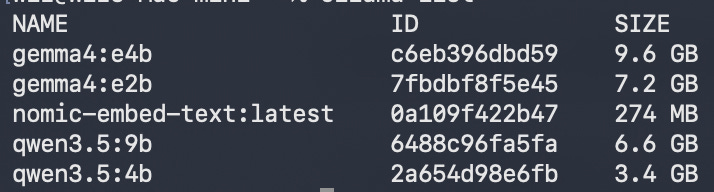
ollama pull gemma4:e2b        # Fast tier (7.2 GB, 2.3B effective, vision+audio)
ollama pull gemma4:e4b        # Primary tier (9.6 GB, 4.5B effective)
ollama pull nomic-embed-text  # Local embeddings (274 MB, optional)

# Step 3: Set environment for 16GB systems
export OLLAMA_FLASH_ATTENTION=1
export OLLAMA_KV_CACHE_TYPE=q8_0
export OLLAMA_KEEP_ALIVE=10m
export OLLAMA_MAX_LOADED_MODELS=1
Option B: Qwen 3.5 (what I started with, still solid)
# Same Ollama install, different models
ollama pull qwen3.5:4b        # Fast tier (3.4 GB)
ollama pull qwen3.5:9b        # Primary tier (~6 GB)
The 35B Heavy Tier (works with either Option A or B)
# Step 4: Install llama.cpp for the big model
brew install llama.cpp

# Step 5: Download Qwen 3.5 35B (13 GB quantized)
pip3 install huggingface-hub
python3 -c "from huggingface_hub import hf_hub_download; \
  hf_hub_download('unsloth/Qwen3.5-35B-A3B-GGUF', \
  'Qwen3.5-35B-A3B-UD-IQ3_XXS.gguf', \
  local_dir='~/.local/share/llama-models')"

# Step 6: Start llama-server with the magic flag
llama-server \
  --model ~/.local/share/llama-models/Qwen3.5-35B-A3B-UD-IQ3_XXS.gguf \
  --port 8081 --ctx-size 16384 --n-gpu-layers 0 --mmap \
  --flash-attn on --threads 8
Some things that tripped me up:
OLLAMA_MAX_LOADED_MODELS=1 is critical on 16GB. Without it, Ollama tries to keep both the fast and primary models in memory at once and the system just dies. One model at a time, 10-minute idle timeout, then it unloads and frees your RAM.
--n-gpu-layers 0 on the llama.cpp command looks wrong. On Apple Silicon you’d normally offload layers to the GPU. But with mmap, we want the OS to manage the paging. Setting GPU layers to 0 means everything goes through the mmap path. The M4’s unified memory means “GPU” and “CPU” are reading from the same pool anyway, so it doesn’t really matter.
Ollama and llama.cpp coexist on different ports (11434 and 8081). The heavy tier (llama.cpp) is on-demand: I start it when needed and stop it when not. The fast and primary tiers (Ollama) run as a LaunchAgent, always on, auto-restarting. Two separate inference servers on one Mac Mini. Works fine.
What I Actually Learned
Local models are not Claude. They can’t chain multi-step tool calls, refactor code, or make creative decisions. Claude Code does this because Anthropic spent years on tool calling. Local models aren’t there yet. But that’s fine. I don’t need them to be Claude. I need them to classify messages in 2 seconds and compress context before Claude sees it.
The mmap thing is probably the most underappreciated trick in this whole setup. One flag. The difference between “impossible” and “17 tok/s with zero swap.” If you have Apple Silicon and an NVMe SSD, you can run models much larger than your RAM would suggest. I’m running it daily. It just works.
Centralizing model names saved me. I had three files with hardcoded "qwen3.5:9b". Found them all during the swap. If I’d had ten files like that, a quick migration would’ve been a 2-hour headache. Lesson learned (although honestly I should have known better).
I benchmarked before swapping, and I’m glad I did. Google’s marketing said Gemma 4 was better. The benchmarks confirmed speed gains but also showed a slight accuracy regression. Speed got better, instruction following got slightly worse. That’s a tradeoff I chose to accept, not one that surprised me in production.
One more thing: Gemma E2B is 7.2GB on disk (vs Qwen 4B at 3.4GB). Looks huge. But that’s because it bundles vision and audio encoders. Loaded RAM is nearly identical. I almost rejected it based on download size. Would have been a mistake.
And the thinking mode thing. Disable it for fast tasks. 30x speed difference for classification. This single setting is the difference between a usable triage system and a painfully slow one. Test it. Seriously.
Where This Is Going
Local models are real infrastructure now. Not toys. Production preprocessing, signal compression, memory consolidation, fallback. Running 24/7 on a $600 machine.
A year ago, useful local inference meant a $3,000 GPU. Now a base Mac Mini handles three tiers. The models keep getting smaller and faster. Gemma 4’s E2B classifies messages in under 2 seconds with 2.3 billion effective parameters. And it can see images and process audio. For my setup that previously had to skip voice messages entirely, that alone was worth the swap.
Next I want to test the Gemma 4 26B MoE variant (26 billion total, 3.8 billion active per token) as a replacement for the Qwen 35B heavy tier. If the GGUF works well with llama.cpp and mmap, that’s the full stack on Gemma. One model family for everything.
If you’re building any kind of AI agent system, try this pattern. Local for the frequent and cheap. Cloud for the complex and expensive. Cost savings compound. Reliability improves. You stop depending on any single provider staying online.
Gemma for preprocessing. Claude for thinking. Both got better at their jobs by not trying to do the other’s.
For running AI automations and classification I use make.com rather than a local setup since it's - in theory at least - always-on. The tasks and pipelines I run there are lightweight enough that in the most cases no extensive context is needed to complete them: https://metacircuits.substack.com/p/how-i-built-my-second-brain-in-3
I'm paying roughly USD 10 per month in API credits for classification, analysis, and summarization, but don't expect to be running this setup indefinitely so I don't see the need to switch for the moment.
Very interesting! There's probably a market for startups who can build this kind of offering for businesses and help them save $$$. It addresses a key shortcoming of Claude and big LLMs: they're optimized for heavy duty stuff but charge the same price for easy task. The delegation model is elegant. Ideally, the app on your PC would decide which model to use (local vs cloud) and do all the fancy optimization for you (similar to your approach.