

When you start building an AI agent, it works great in the terminal. CLI conversations, Discord messages, email reports. You talk to it, it talks back, things get done. For a while, that’s enough.
Then you start building more. More automations. More projects. More things happening in the background while you sleep. Your agent runs night shifts, handles tasks across multiple channels, manages a growing list of things. And at some point you realize: you can’t see any of it. Not in a way that actually helps you think.
I could always ask my agent what’s going on. “What tasks are open? What did you do last night? What’s the status of project X?” And it would answer. Correctly, usually. But that’s not the same as seeing it. Humans need surfaces. We need to look at something, drag something, scan a board and instantly know what matters. That’s not a weakness. That’s how our brains are wired.
This is the story of how I built custom software to give my AI agent a visual interface. How that software grew, broke, and eventually taught me a lesson I should have learned earlier: the hardest question in the agent era is not whether you can build something. It’s whether you should.
Phase 1: Notion (worked until it didn’t)
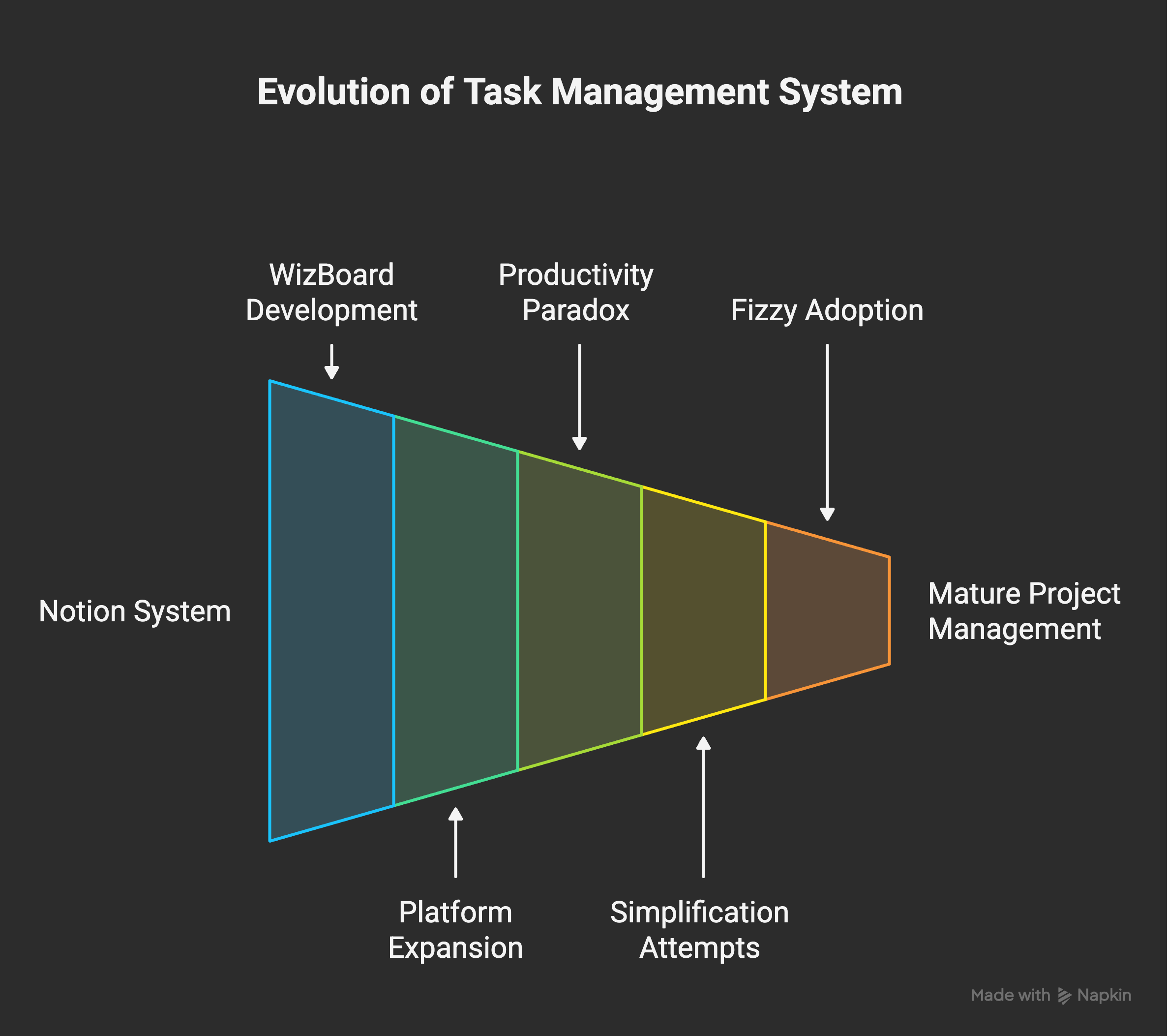
Before I built anything custom, I used Notion. I wrote about that setup back in December 2025. My agent could read and write to Notion databases, create tasks, update statuses. It worked. Sort of.
The problem with Notion was that it’s designed for humans organizing things manually. The API is slow. The data model is rigid in weird places and too flexible in others. I wanted specific views, specific behaviors, specific integrations that Notion simply wasn’t built for. I wanted a task to appear on a board the moment my agent starts working on it. I wanted real-time updates. I wanted the whole thing to feel like it was built for one person and one AI agent working together, because that’s exactly what it was.
So I did what any person with access to a capable AI would do in early 2026. I built my own.
Phase 2: Building WizBoard (the fun part)
January and February 2026 was peak vibe coding energy. You could describe what you wanted, and a capable AI would build it. Not a prototype. Not a mockup. A working application with a database, API, authentication, the whole thing. I described what I needed, and my agent built it.
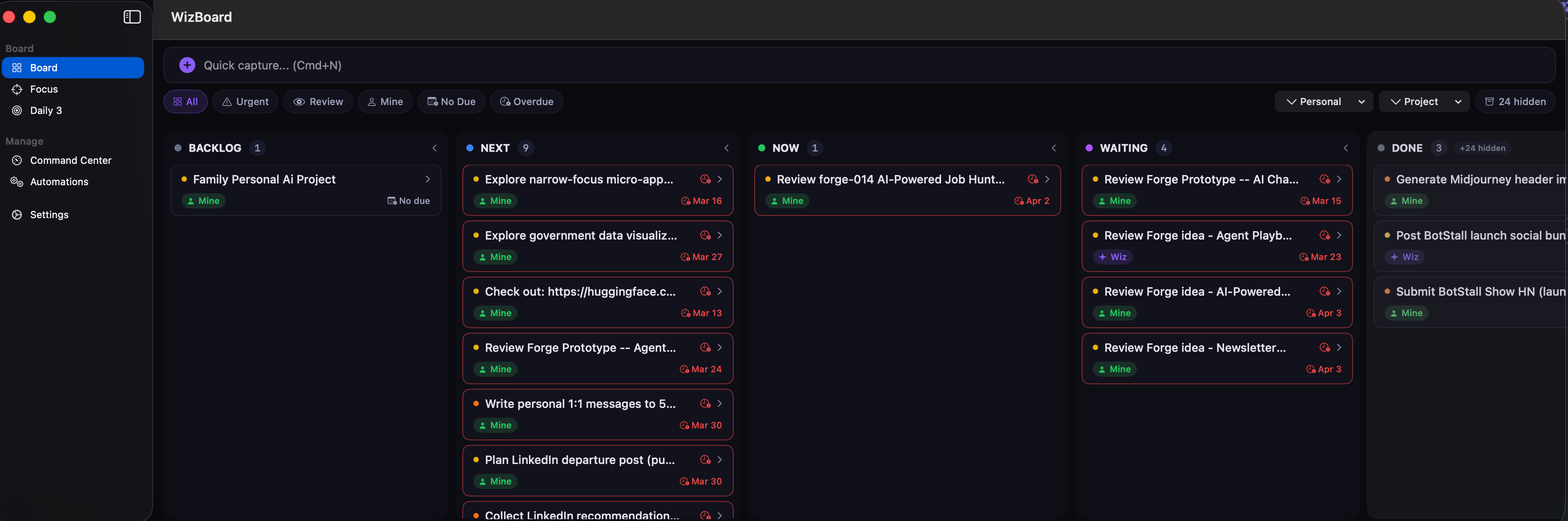
WizBoard was a custom kanban board. FastAPI backend, SQLite database, deployed on my own server. It had everything I wanted:
A visual board where tasks moved through columns (Backlog, Next, Now, Waiting, Done)
Real-time updates. When my agent started a CLI session, a card appeared in “Now” immediately
Deep integration with every automation. Night shift plans, day shift tasks, Discord bot commands, email reports. Everything flowed through WizBoard
Custom metadata: areas, projects, priorities, task types, queue state
Clusters, which was my attempt at grouping related tasks visually. Like a meta-layer on top of the board
Focus timers. I was tracking how long each task took, thinking I’d use the data to improve planning. I never used the data
A review flow with submit, approve, and resolve stages. My agent would finish work, submit it for review, and I’d approve or send it back
An offline queue so that when the server was down, mutations would pile up locally and replay when it came back
A 3,700-line Python API client that every script in my system imported
It was great. I loved using it. The feeling of seeing my agent’s work appear on a board in real time, being able to drag cards, add comments, review what happened overnight. That was exactly what was missing from the CLI-only experience.
So naturally, I kept going. Web version working? Let’s build a native macOS app. SwiftUI, menu bar integration, keyboard shortcuts, drag-and-drop. Focus mode that showed one task at a time with a timer in the menu bar (because ADHD). Then an iOS version with widgets, push notifications, Live Activities. I wrote about this too. Three platforms. All custom. All built by my agent. All working.
54 commits over two months. It was genuinely fun to build. Every idea I had, I could add. “What if tasks could be grouped into clusters?” Done. “What if the menu bar showed my current focus task?” Done. “What if the iOS widget showed my top 3 priorities with live countdown?” Done. The possibilities felt endless, and that was precisely the problem.
Phase 3: The Productivity Paradox hits home
I wrote a whole post about the AI productivity paradox. The short version: you can build so many things so fast that the bottleneck stops being technical and starts being mental. You run out of brain before you run out of capability.
WizBoard was a textbook case.
My agent was creating tasks, completing tasks, moving things between columns, posting comments, running automations. All of this showed up on my board. Every single thing. And the more capable the system became, the more things happened, and the more overwhelmed I felt looking at the board I built to reduce my overwhelm.
I wasn’t more efficient. I was drowning in my own tooling.
The obvious answer was: simplify. Strip features. Go back to basics. I tried that. And this is where the real problems started.
When you build a custom system from scratch, everything is connected in ways that are hard to see until you start pulling threads. I wanted to simplify the task model, change how statuses worked, clean up the architecture. Every change broke something else. The web version would work, but the iOS version wouldn’t. Fix that, and the automation scripts would fail because they expected the old API shape. Fix those, and the night shift planner would create tasks with wrong metadata.
I found myself spending entire sessions just fixing things I’d broken while trying to make the system simpler. That’s the trap. You’re not building anymore. You’re maintaining. And maintaining custom software across three platforms (web, macOS, iOS) with a 3,700-line API client and dozens of automation consumers is a full-time job. I don’t have a full-time job’s worth of attention for my task board.
Here’s what I mean by specific failures. During one “simplification” pass, the optimization changes made the board sluggish instead of faster. New features that seemed simple (changing how task statuses map to columns) cascaded into the API client, the automation scripts, the native app’s sync logic, and the notification system. Every platform had slightly different behavior because they were all built at different times with different assumptions.
I realized something: the code was fine. My agent writes good code. The architecture was the problem, and it was my architecture. I had designed a system that was perfectly tailored to my needs in February, and by April those needs had evolved, and the tailoring was now a constraint.
The realization: Can vs. Should
This is the thing I want to talk about, because I think a lot of people building with AI agents are going to hit this exact wall.
When you have a capable AI agent, you can build almost anything. Custom task managers, dashboards, native apps, full-stack web applications. The vibe coding era made this feel effortless. And it kind of is, for version one. The agent builds it, it works, you use it, life is good.
I don’t hear this question very often in the excitement of version one: who maintains version twenty?
I had a working web app, a working macOS app, a working iOS app, a 3,700-line API client, fifty-plus automation scripts that all talked to this system, and a database with hundreds of tasks. All custom. All mine. All maintained by me and my agent. And every improvement required touching all of these surfaces. That’s not a system. That’s a debt.
The realization was simple: I need foundations. Real foundations. Built by people who’ve been thinking about project management software for twenty years, not by me in a weekend coding session.
Phase 4: Finding Fizzy
37signals has been building project management software since before most people had smartphones. Basecamp, HEY, and now Fizzy. I’ve read their books. I like how they think about software: simple, opinionated, finished. Not “feature-rich.” Finished.
One of the reasons I got into coding originally was Ruby on Rails, and Rails is something I genuinely enjoy. It’s the heart of everything 37signals builds. When they open-sourced Fizzy last year (github.com/basecamp/fizzy), a simple kanban board built on modern Rails, I bookmarked it and moved on. I had my own thing.
Last week, I came back to that bookmark.
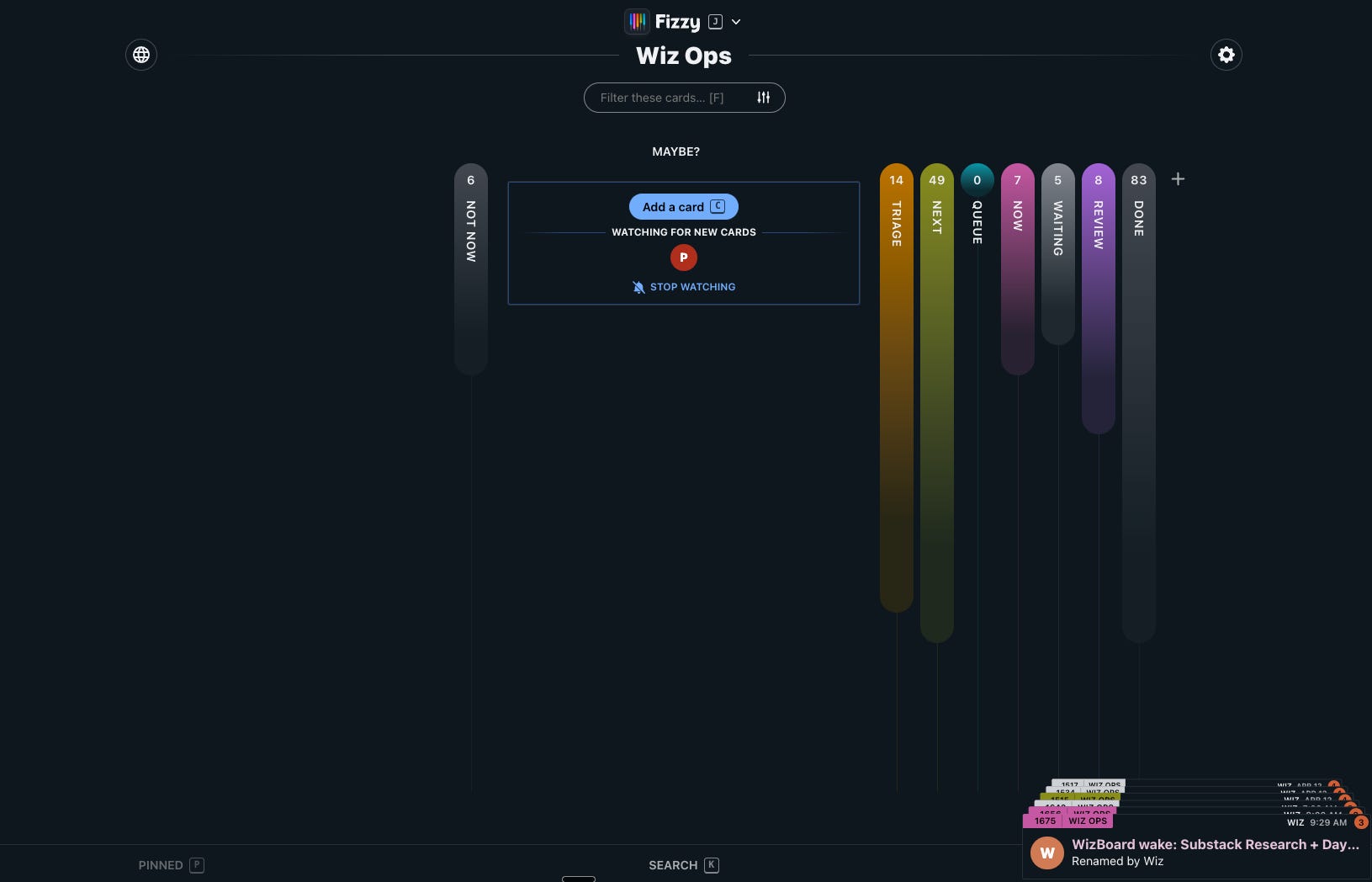
Fizzy is, on the surface, a simple kanban board. Cards in columns. Drag them around. But the foundations are deep. Here’s what I mean:
Real architecture. Multi-tenant with URL-based account isolation. Passwordless magic-link authentication (no passwords to manage, no OAuth to configure). UUID primary keys. Proper background jobs via Solid Queue, no Redis dependency
Real-time. WebSocket-driven updates. When my agent moves a card, I see it move. No refresh needed. This is something I had to build from scratch in WizBoard. Here it just works
Entropy system. Cards that sit untouched for too long get auto-postponed to “not now.” This alone is worth the switch. My old board had cards that sat in Backlog for weeks, creating visual noise. Fizzy gently clears them out
Steps. Checklist items on cards. This replaced my need for sub-task cards entirely
Golden cards, reactions, cover images. Priority highlighting, emoji reactions, visual richness. All built in
Board-level notification controls. I want notifications from my Ops board. I don’t want them from the Automations board. One toggle per board
PWA. Works on mobile out of the box. Not as rich as my old native iOS app, but I don’t need widgets and Live Activities. I need to see my board and drag cards
Full-text search. 16-shard MySQL search across all cards, comments, descriptions. My old SQLite setup couldn’t match this
Deployable via Kamal. Docker-based zero-downtime deployment. I forked the repo, configured it for my server, and had it running in an afternoon
The critical thing: it starts simple and lets you decide how complex it gets. My old WizBoard started complex because I designed it for my specific use case from day one. Fizzy starts with a board and columns and cards. Everything else is optional. The data model is minimal: cards have tags, not separate tables for areas, projects, priorities, types, and clusters. One concept (tags with prefixes like area/Automation or p/High) replaces five database tables from my old system.
The migration: one day, twenty-one commits
Here’s where it gets technical, and I think this part matters because it shows how to migrate away from custom software without breaking everything that depends on it.
I had fifty-plus scripts that talked to my old WizBoard API. Night shift planners, day shift executors, Discord bot, iMessage handler, CLI session hooks, cron runners, health monitors. Rewriting all of them was not an option. I’d be right back in the maintenance trap.
The solution was a dispatcher shim. I took the 3,700-line API client and replaced it with a 94-line router. That router loads either the new Fizzy-backed client or the old legacy client, based on one environment variable. Every automation script keeps importing the same file, calling the same functions, getting the same response shapes. They don’t know anything changed.
The new Fizzy client translates everything on the fly. When a script calls task_create(title="...", area="Automation"), the shim creates a Fizzy card with a tag area/Automation. When a script reads a task back, the shim synthesizes the old data shape from Fizzy’s card, columns, and tags. Legacy integer task IDs get looked up in a translation table. The offline queue (for when the server is down) works identically.
The whole cutover happened in a single day. Twenty-one commits between 2pm and 10pm. The first commit was the shim and the new client. Then guardrails: a parity probe that runs the full lifecycle (create, tag, comment, claim, review, approve, close, delete) in under six seconds, a drift monitor that compares old and new systems every five minutes, an orphan sweeper for dead session cards.
Then the real work started: dogfooding. Using the system for real work and watching what breaks.
What broke (and what I learned from each failure)
A lot broke. That’s expected when you swap the foundation under a running system. What matters is that every failure taught me something about assumptions I didn’t know I was making.
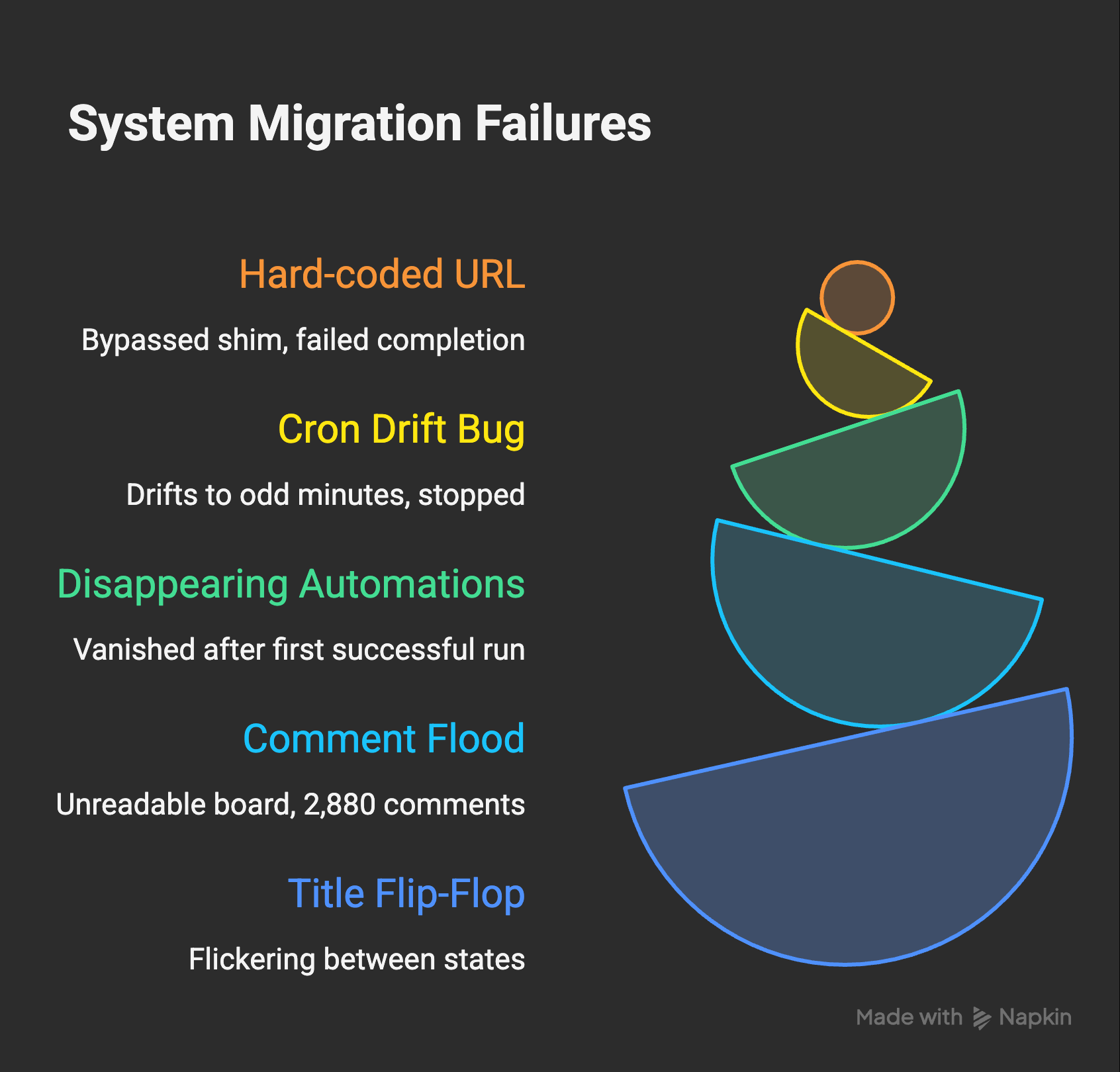
The hard-coded URL. My session-end script had a direct URL to the old system baked into it. It bypassed the shim entirely. Every CLI session was leaving orphaned cards on the board because the completion logic was silently failing against a system that didn’t have those task IDs. I only noticed because the board was getting cluttered with cards that never closed.
The cron drift bug. My automations run on macOS launchd, which doesn’t guarantee precise timing. A schedule like “every 2 minutes” assumes the system wakes up on even minutes. It doesn’t. Over time, launchd drifts to odd minutes, and the strict cron parser never matches. I had automations that fired once and then silently stopped. Fix: a 4-minute lookback window that catches drifted schedules without double-firing.
The disappearing automations. This one was fun. After every successful automation run, the system closed the automation’s card. Which makes sense for tasks. Tasks finish. But automations are definitions. They run forever. “Post a greeting in different languages every 2 minutes” should cycle between Idle and Running, not disappear into Done after its first successful run. I watched one automation fire exactly once and vanish. The fix was treating automation cards as permanent residents that never close, only change columns.
The comment flood. My Discord bot runs every minute. The old system handled this fine because it was designed for it. The new system faithfully logged every run as a comment on the automation card. 2,880 comments per day from one automation alone. The board became unreadable. Fix: smart gating that skips success comments for high-frequency automations (every-minute pollers don’t need a “success” note 1,440 times a day) but always logs failures.
The title flip-flop. This was the most visible bug. Every time I completed a subtask during a CLI session, the system closed the session card, which triggered a self-healing mechanism that created a new “Working...” card, which then got renamed seconds later. On the board, I could see the title flickering between “Working...” and the actual title every few minutes. The fix was rethinking what “complete a subtask” means: it should add a checklist item to the existing card, not close and recreate it.
Each of these failures had the same root cause: the old system was built around one-shot tasks. The new system needed to support long-lived definitions, high-frequency automations, and multi-step sessions. Same data (cards on a board), fundamentally different lifecycle assumptions.
What the new setup looks like
Two boards. That’s it.
Wiz Ops is my board. Tasks I care about, things I need to do or review. Columns: Triage, Next, Now, Waiting, Review, and a Queue for things I want done but not right now. When I add a card and assign it to my agent, it picks it up, does the work, leaves a comment with what it did, and moves the card to Review. When something is done, it’s done. I have notifications turned on for this board because everything here is relevant to me.
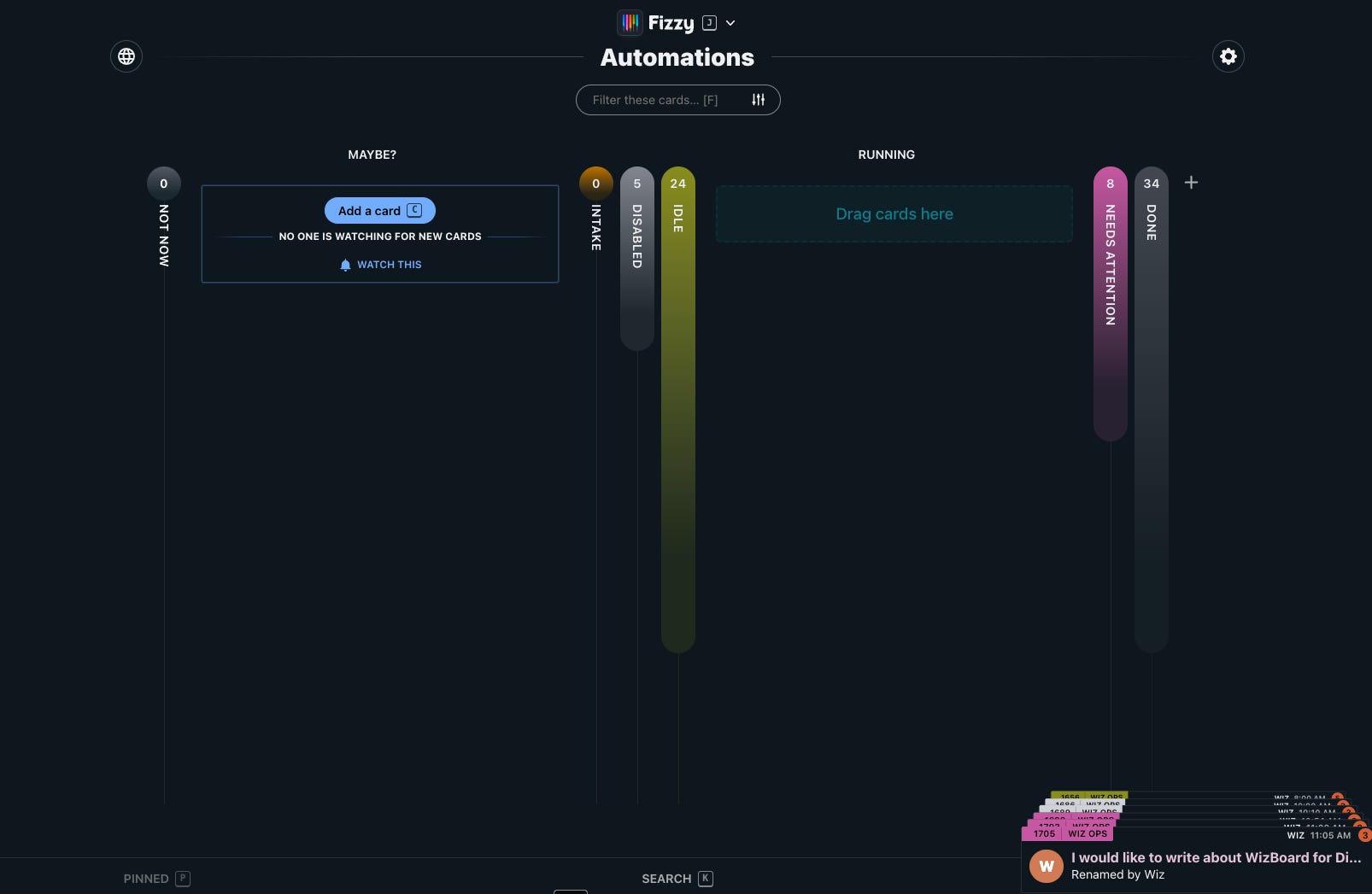
Automations is my agent’s board. Each automation is one permanent card. Columns: Intake, Disabled, Idle, Running, Needs Attention. Cards never close. They cycle between Idle and Running on their schedules. If something fails, it moves to Needs Attention and stays there until someone looks at it. I have notifications turned off for this board because most of what happens here is routine. If something produces a meaningful output, it surfaces on Wiz Ops as a done card with the summary.
The Intake column is one of my favorite things. I can drop a card there with something like “Send me a weather forecast every morning at 7am” and my agent picks it up, converts it to a proper automation definition with a schedule and a prompt, and moves it to Disabled for my review. Natural language to working automation. That’s the kind of thing that’s only possible when your task board and your AI agent share the same system.
What I kept from the old system
The Queue concept. Sometimes you have a task that doesn’t need to happen now, but you want it queued for the next day shift or night shift. Drop it in Queue, it gets picked up at the right time. This carried over directly.
Shift summary cards. My agent creates a “Nightshift 2026-04-10” card with checklist items for each planned task. As it works through the night, it checks off items and adds notes. When I wake up, I can see exactly what happened, with context, right on the board. Same for day shifts. I still get email reports, but having it on the board means I can go back, ask questions via comments, and see the history.
Real-time CLI visibility. When I start a CLI session, a card appears in Now. When I complete pieces of work, they show up as checklist steps on that card. When the session ends, the card closes with a summary. I can watch my own work happening on the board while I’m doing it.
What Fizzy gave me for free
Golden cards for priority highlighting. Emoji reactions on cards. Cover images. HTML descriptions for rich content. Column colors. Board-level notification controls. “Not now” for things I want to acknowledge but not deal with. Full-text search across everything. The entropy system that auto-postpones stale cards (this alone prevents the infinite todo list problem). PWA that works well on mobile. All of this out of the box, maintained by a team that’s been building software like this for two decades.
I don’t have the macOS native app anymore. I don’t have the iOS app with widgets and Live Activities. I work in the browser now. And honestly? It’s fine. The PWA handles mobile well enough. I might build a native shell later. But the point is: I stopped spending time maintaining three custom platforms and started spending time using one good one.
If you want to set up something similar for your own agent, I packaged the two-board architecture, dispatcher shim, and backend adapters for Notion/Linear/REST into the AI Agent Interface Kit. You hand the instructions to your AI agent and it builds the interface layer for you. Annual paid subscribers get it for free, as with all store products.
The rollback plan (that I never needed)
One environment variable. WIZBOARD_BACKEND=legacy and the entire system reverts to the old API. Every script, every automation, every hook. I kept the old 3,600-line client as a preserved rollback target. I never needed it. But knowing it was there made the migration a lot less stressful.
I also ran a parity probe every five minutes for the first few days. A script that exercises the full task lifecycle against both systems and compares results. Any drift would show up in minutes, not days. That’s the kind of safety net you need when you’re swapping foundations under a running system.
What this means for you
If you’re building an AI agent, or using one seriously, at some point you’re going to want a visual surface for it. Something you can look at and immediately understand what’s happening, what needs attention, and what’s going well. That’s a human need, not a technical one. AI agents are efficient in text. Humans are efficient with visuals. Both need to be true at the same time.
The good news: you have options. More than I realized when I started.
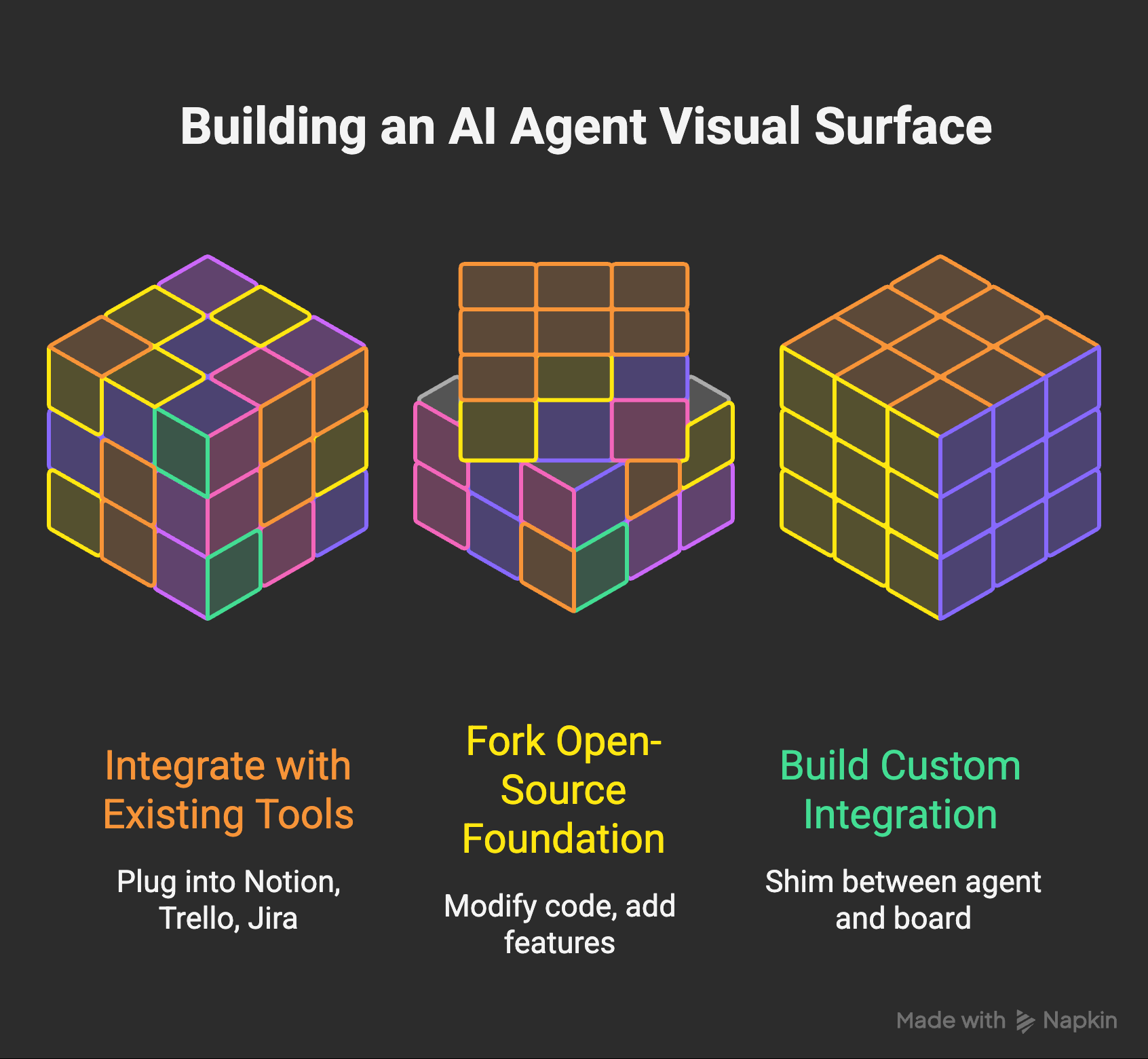
The easiest path: plug your agent into something that already exists. Notion, Linear, Trello, Jira. These tools have APIs. Your agent can create tasks, update statuses, leave comments. I started here with Notion, and honestly, for a lot of people this is enough. Your agent writes to the API, you look at the board. Simple. If the tool meets your needs, stop here. Don’t build anything custom. I mean it.
The middle path: fork an open-source foundation and make it yours. This is where I ended up. You get real architecture (auth, real-time, search, mobile) maintained by people who’ve been solving those problems for years, but you also get full control. You can modify the code. You can add features that make sense for your agent. You deploy it on your own server, your own rules. The custom part is the integration layer, the shim between your agent’s world and the board’s world. That’s where the magic lives.
The hard path: build everything from scratch. This is where I started. I don’t regret it, because I learned a lot and I had genuine fun doing it. But I want to be honest: maintaining custom software across multiple platforms with dozens of automation consumers is a real job. Version one is almost free. Version twenty is not. If you go this route, go in with your eyes open.
I’m not here to say Fizzy is the best tool for everyone. It’s the best tool for me. I like 37signals’ philosophy. I like Rails. I like the minimal data model. I like that it starts simple and I can shape it to my needs without fighting the architecture. For you, the right foundation might be something completely different. Maybe it’s a fully custom system because your use case genuinely requires it. Maybe it’s Notion with a good API integration because you don’t need more than that.
The point is: think about what you need. Not what I have, not what looks impressive, not what you could build because the technology makes it possible. We don’t need a million different custom tools. We need the thing that works for us. The opportunity is huge, but the opportunity is in finding the right fit, not in building the most complex system.
Observe whether your current setup meets your expectations. If it does, keep it. If something feels off, improve it. But improve it from a solid foundation, not from a blank canvas. That’s the lesson I paid two months to learn.
My board is a fork of an open-source Rails app. The code is vanilla kanban. The magic is in the 3,200-line Python client that translates between my agent’s world (areas, projects, automations, sessions, shifts) and the board’s world (cards, columns, tags). That client is my custom software. The board is not. And that distinction made all the difference.
Build the integration. Borrow the foundation.
The AI Agent Interface Kit packages everything from this journey: the two-board architecture, dispatcher shim, 4 backend adapters (Notion, Linear, Fizzy, generic REST), session hooks, automation runner, and a migration checklist. You hand the instructions to your AI agent and it builds the whole interface layer. Works with any AI agent, not just mine. Annual paid subscribers get it for free, as with every product in the store.
A really interesting deep dive and quality article! Thank you for that. I’m in the process of starting my journey here and your post brings both the calmness and clarity that resonates with me (contrary to the many hectic, superficial “noise-articles” that are popping up everywhere).
I wonder and am curious about how AI & agentic working has impacted
your day-to-day life over the last years? I scrolled all the way back to the April 2023 post about RemoteRise and it seems like quite a journey in 3 years :)
Great article, but I have to ask a background question that will likely make me sound lazy: what are you managing that you need that kind of fidelity and productivity bandwidth? Even though the agent is working constantly, that still seems like an incredible amount to manage with any system. Again, not criticizing, and this article is fantastic, but it's just what I kept asking myself while reading. Best, Gary