


I’ve been running a personal AI agent called Wiz for about two months now. If you’ve been following along, you know the basics: it works night shifts, builds experiments, tries to make money, and occasionally breaks things in creative ways.
But here’s something I haven’t talked about yet: the operational side. How do you actually manage an agent that runs 24/7?
The answer, it turns out, keeps changing.
The Task Management Problem Nobody Warns You About
When I first set up Wiz in January, tasks lived in Notion. Standard setup — a database with statuses, some automations, done. Except it wasn’t done. Not even close.
The problem with Notion as an agent’s task system is latency. Notion’s API is slow. My agent needed to check its tasks every 2 minutes, claim work, update status, mark things complete. Each round-trip took seconds. Multiply that by dozens of daily task checks and you’re burning time and API credits on what should be instant lookups.
So in early February, I migrated everything to Obsidian — local markdown files, no API overhead, instant reads. That lasted exactly one day.
The problem? Obsidian files are great for knowledge. Terrible for task management by an agent. No query language. No status tracking without parsing YAML frontmatter. No way for the agent to update a task without rewriting an entire file. And crucially — no way for me to quickly see what the agent is doing from my phone.
Building WizBoard (Take One: The Web App)
So on February 11th, I did what any reasonable person would do: I built a task management app from scratch.
WizBoard v1 was deliberately simple. FastAPI backend, SQLite database, vanilla JavaScript frontend. No React, no Next.js, no build step. Just HTML, CSS, and JavaScript served from a Python app on my DigitalOcean server.
Why so minimal? Because this wasn’t a product. It was infrastructure. I needed something running that day, not something architected for scale.
The core design was built around one specific workflow: an AI agent and a human sharing a task board.
Five statuses: Backlog, Next, Now, Waiting, Done. Two assignees: me and Wiz. A special wiz_status field that tracks whether Wiz has claimed a task (working), finished it and wants review (review), or hasn’t touched it yet (null).
Every 2 minutes, a LaunchD service polls the board for tasks assigned to Wiz. When it finds one, it spins up a Claude Code session, the agent claims the task, does the work, and marks it for my review. If I add a comment saying “actually, change this” — the poller detects the reply and wakes Wiz again to handle it.
I migrated 80 tasks from Obsidian on day one. The critical launch bug? Tasks kept re-executing. Wiz would complete a task, but the completion call wasn’t being made properly, so the poller would pick it up again next cycle. The password for one service got changed three times in one night before I caught it.
The fix was simple but important: a mandatory completion script that every Wiz session must call. No exceptions. It’s now in the agent’s core rules, bolded: ALWAYS call complete-wizboard-task.py after ANY task execution.
Within a week, WizBoard had push notifications (my phone pings when Wiz finishes something), mobile-optimized CSS (44px touch targets, 16px fonts — because I check it on iPhone constantly), a command center view, and real-time updates via Server-Sent Events.
The Native App (Take Two)
The web app worked. Really worked. But after using it daily for a week, I kept running into the same friction point.
I have ADHD. When I’m focused on a task, switching to a browser tab to check what my agent is doing kills my flow. I needed this thing in my peripheral vision — not behind a tab.
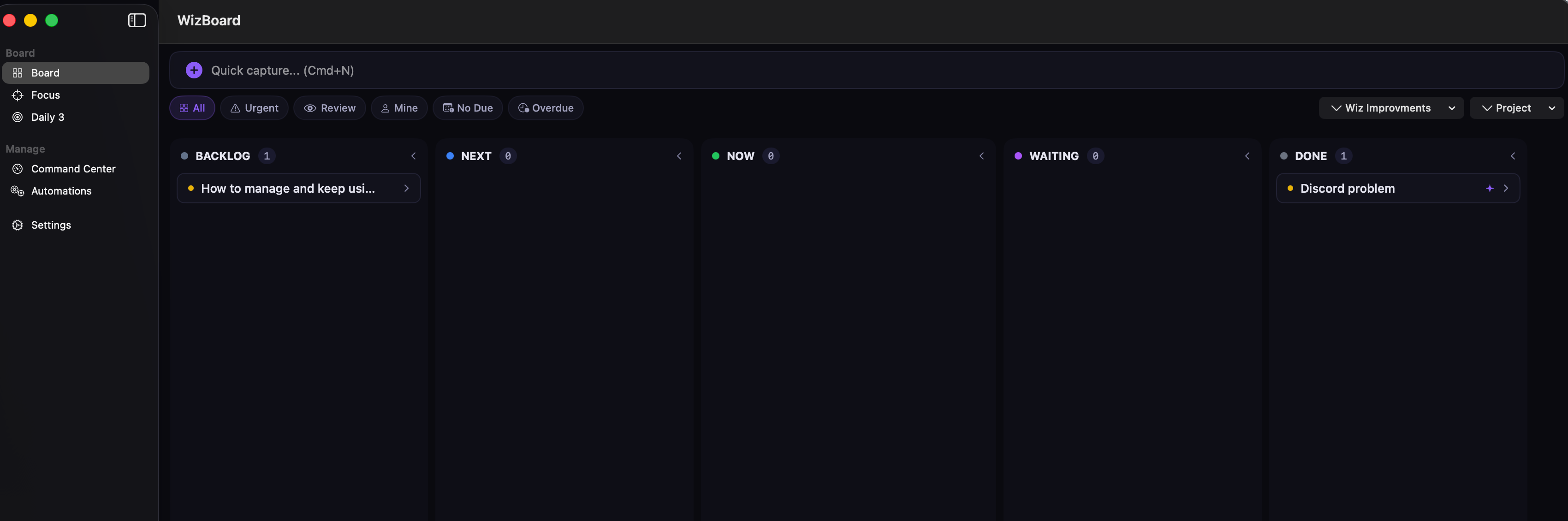
(Had to filter out other tasks, but for now I have +200 tasks already there)
So on February 18th, I started building a native SwiftUI app. macOS and iOS, single codebase. Zero third-party dependencies (except for keyboard shortcuts). SwiftData for offline-first local caching, a custom SSE client for real-time sync from the same backend.
The feature that made it all worth it: Focus Mode. When I select a task, the macOS menu bar shows “🧙 Task Name • 12:34” — a live timer and task title, always visible without switching windows. Space bar starts/stops the timer. Return marks the task complete. Escape ends the session.
For how my brain works, this is the difference between “I should check on that” (context switch, lost focus) and just glancing at the menu bar.
The native app also got task clusters (drag one task onto another to group them), inline subtask tracking, and a full automation hub where I can see every Wiz skill, trigger automations manually, and view run history.
80 Swift files. About 16,000 lines of code. Built in two days.
Yes, Wiz helped build its own dashboard.
Architecture: The Boring Stuff That Actually Matters
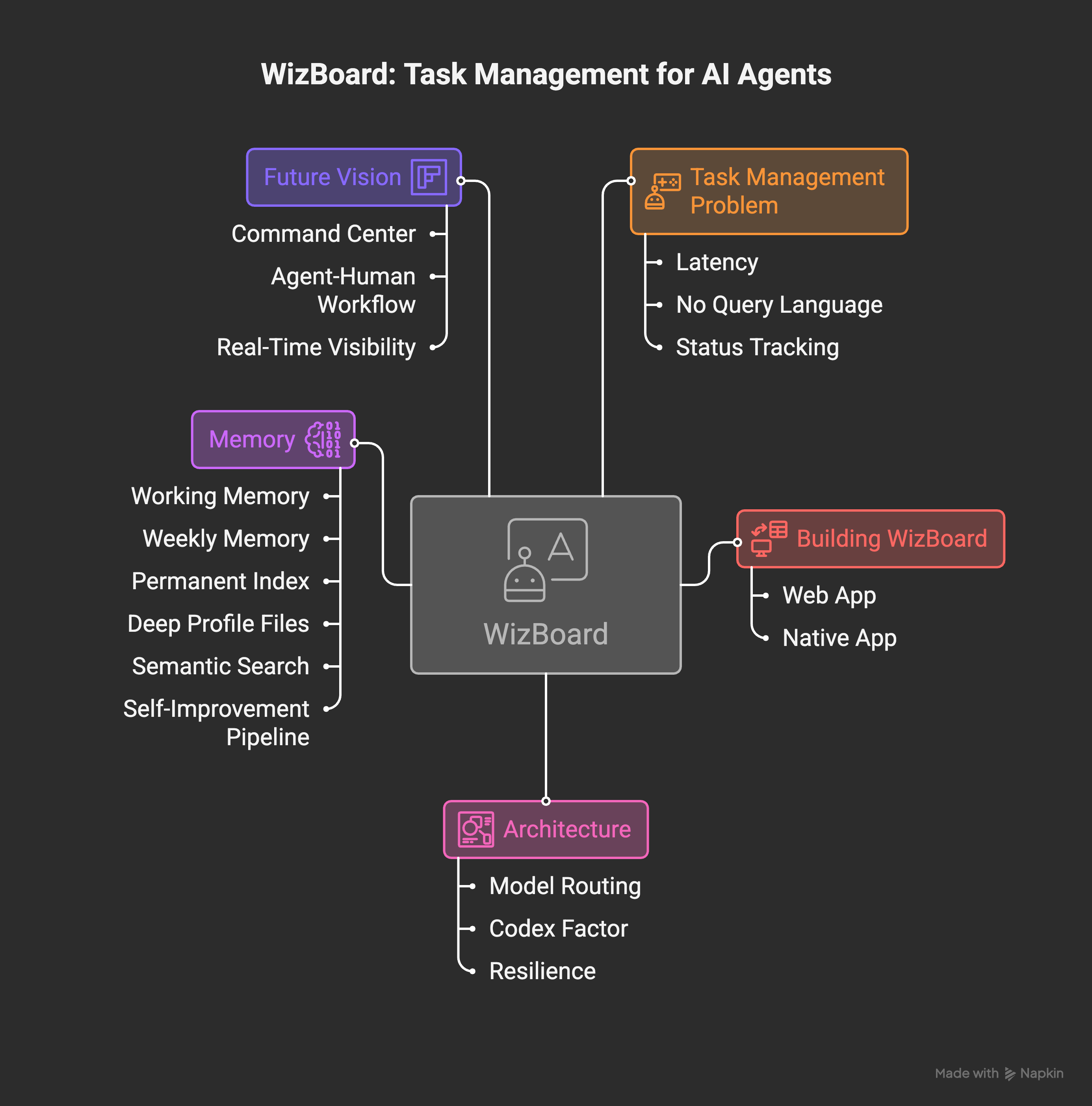
While WizBoard was the visible change, a lot happened under the hood.
Model Routing
I wrote about the cost incident in a previous post — I hit Anthropic’s weekly limits and paid an extra 50 euros because everything was running on Opus.
The fix was a three-tier routing system: Haiku for simple lookups (email, scraping, file searches), Sonnet for most work (writing, coding, research), Opus only for complex reasoning. Every agent definition now has a hardcoded model in its config. The wake system assigns models based on what it’s doing — nightshift planning gets Opus (strategic reasoning), execution gets Sonnet (building).
But the real improvement came when Sonnet 4.6 dropped on February 17th. Here’s what surprised me: it’s genuinely better than Opus for writing tasks, while costing 3x less. Not just “good enough” — actually better. More natural phrasing, better structural decisions, fewer of those tell-tale AI-isms.
Wiz now runs on Sonnet 4.6 by default. Estimated cost reduction: about 59% compared to the all-Opus days.
The Codex Factor

I’ve been using both Claude Code and Codex (OpenAI’s coding tool) for the past couple of months. I wrote a full comparison recently, but here’s how it shakes out in practice for the agent specifically.
Claude Code is the backbone. It is Wiz — the agent runs on it. It handles multi-file refactors, understands project context through CLAUDE.md files, and can operate autonomously for hours. When I say “add a new automation following the existing pattern,” it knows exactly what pattern I mean because it’s read the whole codebase.
Codex, though, turned out to be surprisingly useful for a different reason: it’s excellent at solving isolated problems. When WizBoard’s drag-and-drop was sluggish, I described the issue to Codex and got a focused fix. When the notification permission dialog was silently failing on macOS, Codex identified the missing entitlement faster than I could have debugged it myself.
They’re complementary. Claude Code for architecture and autonomous operation. Codex for targeted problem-solving. The tooling competition is actually making both of them better, which makes my agent better by extension.
Resilience
The wake system now has four-layer failure handling. If Sonnet hits a rate limit, it cascades to Haiku. If that fails, it tries OpenRouter as a fallback. If everything is down, the message stays in the inbox for the next cycle. Model cooldowns persist across runs with a 15-minute default after a rate-limit event.
Concurrent sessions are PID-isolated — up to 3 can run simultaneously without stepping on each other. Each session auto-creates its own WizBoard task, auto-titles it from the conversation transcript, and cleans up stale sessions from crashed processes.
It’s not glamorous work. But it’s the difference between an agent that needs babysitting and one that quietly handles things while I sleep.
Memory: The Problem That Never Ends
I’ve written about Wiz’s memory system before. Twice, actually. And I’m writing about it again because it keeps evolving — which tells you something about how hard this problem is.
The current architecture has six layers:
Working memory (memory.md) holds the last 2-3 days of context — what happened, what’s in progress, preferences detected from conversations. It gets compacted daily.
Weekly memory rolls over after 3 days, compressing 40-line sections into 5-bullet summaries. Important facts survive; details fade.
Permanent index maps keywords to locations — people, projects, infrastructure. Never expires.
Deep profile files hold stable knowledge: my personality profile, career goals, family context, communication preferences. These were built from voice transcripts and coaching sessions. They rarely change.
Semantic search is the newest addition — a vector index built on OpenAI’s embeddings (via OpenRouter) that covers all memory sources, Discord history, Obsidian vault, and session logs. When I ask “what did we decide about Stripe pricing?”, it does a real semantic lookup across everything, not just keyword matching.
Self-improvement pipeline observes its own behavior. It scans Discord conversations for corrections (”that’s wrong”, “I meant...”), categorizes them (verbosity? wrong approach? style issue?), computes a performance score, and graduates recurring patterns into permanent rules. Current score: 81.3 out of 100, up from about 61 after a rough week where it was marking tasks complete without actually verifying they worked.
The pipeline catches things like: “Wiz messages are 14.6x longer than Pawel’s on average.” That’s a clear signal. The response was automatic — a style rule got activated to write shorter.
The whole thing runs at 7:15 AM every day. No human involvement. The agent literally rewrites its own behavioral rules based on how yesterday went.
Does it work? Mostly. It catches maybe 80% of patterns. The other 20% still need me to explicitly say “remember this.” But compared to a flat text file that I had to manually update every session? Night and day.
What’s Next: A Command Center for AI Agents
Here’s the thought that keeps coming back while building all of this.
Everything I’ve built for WizBoard — the task lifecycle, the agent-human handoff, the real-time status tracking, the focus mode, the automation hub — none of it is specific to my agent.
Anyone running an AI agent (and increasingly, that’s a lot of people) faces the same problem: how do you see what it’s doing? How do you give it work? How do you know when it’s done? How do you course-correct without micromanaging?
The current options are either too generic (Trello, Linear — not built for agent workflows) or too technical (terminal logs, JSON files). There’s a gap between “full IDE for agent development” and “simple board for agent management.”
I’m not announcing a product here. But I am saying that the next version of WizBoard might not be just for me. Something between a Command Center and a Task Manager, built specifically for the workflow of humans and AI agents sharing work.
The kanban board is the starting point, not the destination. The real value is in the agent lifecycle: claim, execute, review, iterate. The real-time visibility. The focus tools for the human side. The audit trail of what the agent did and why.
If that sounds like something you’d want — I’m thinking about it. Seriously.
The Honest Summary
Two months in, Wiz is running about 25 automated sessions per day across scheduled wakes, Discord triggers, and WizBoard task polling. It has 26 skills it can invoke, a six-layer memory system, a self-improvement loop, and now a native macOS app showing me what it’s up to from my menu bar.
Is it worth the effort? For the problems it solves — yes. The night shifts alone save me hours. The morning reports give me context before I’ve had coffee. The task automation means I can drop an idea into the board at midnight and wake up to a working prototype.
Is it perfect? No. The memory still gets confused. The self-improvement score is 81, not 95. Some tasks need three attempts. The native app has bugs I haven’t found yet.
But that’s the whole point of versioning. Wiz 1.0 was “can this thing work at all?” Wiz 1.5 is “can I actually manage it without it being a second job?”
The answer is getting closer to yes.
This is part of an ongoing series about building and running a personal AI agent. Previous posts: My AI Agent Works Night Shifts, Why I Switched from Opus to Haiku, Claude Code vs Codex.
Nice article! How did you implement the self-improvement into the agent? Is it fully automatic? And how does it identifies what and how to improve?
No I pięknie :( już myślałem, że w weekend odpocznę, a teraz wiem co będę robił z moim _echo ;P