


The setup, because this only works if the rest of the stack is calm
I have been going through more changes on my AI agent recently. I have been transparent about that here as I go, post by post, and today I want to write about the one layer I depend on the most. But I have to start with how I got to the point of being able to ask “how does my agent actually learn from me?” That part of the story is a little messy and I think it matters.
When I started this project in October 2025, the first thing I built for the agent was its own task manager. A control panel, a dashboard. I went deep on it. I built it native on iOS, native on macOS, and as a web app, all wired together. It worked. For two or three months it was genuinely great.
The problem with self-made software is that you have to maintain it. There is no version of “I reached a level of polish I was happy with, and then I forgot about it.” The dashboard needed constant feedback. What should it show? What should it hide? Where was it pulling data from this week that it had not been pulling last week? It was also burning more tokens than I wanted to think about. So I switched. I moved to a small open-source kanban called Fizzy with a thin shim of my own. That was a quieter setup that I held for a while, and I wrote about the move in detail in the post on replacing my custom dashboard.
Fizzy was good. I was still struggling with one thing though. I needed to be able to orchestrate the agent and also see the projects I was working on from a longer distance. Day-to-day kanban is one job. Stepping back to see what was actually shipping over a month was another. So I made a small personal scratchpad of my own called experiments.jock.pl. It is not for everyone, not everything I am working on is on it, but it gave me a place to lay out the experiments I had in motion at a higher altitude than the task list. That helped, but it was still mine to maintain, and I had the same problem I had with the original dashboard.
What actually solved it was a tool I have used for years and had stopped thinking about. Basecamp. They shipped a dedicated CLI for agents recently, and the whole picture clicked for me. The CLI is what makes the agent side work. The other half of why it clicked, on my side, is the card table inside Basecamp. It is essentially the same clean kanban I liked in Fizzy, but built in. I get the lens I was rebuilding by hand, plus everything else Basecamp does, plus the CLI, all in one place. The agent can read projects, comment on cards, file new ones, complete them, all from the same place I am working. I have tried a lot of pieces of AI infrastructure in the last year and most of them are good enough. This one feels different. Another level, honestly. I can see the whole stack of work at the right altitude. I can move things around. If something is a bigger project I carve out a separate space for it. The board does what I would have spent two more months building for myself, and it does it better.
This is the setup I have been settling into over the last few weeks. The short version is that I have been replacing my custom software with shims on top of mature tools, and so far the replacements keep winning. I write about why I still keep building most of my own stack in building your own things is cool too. The corrections loop is one of the things that only became visible once everything else around it had calmed down.
A small commercial in the middle, on theme
Speaking of evolution. Yesterday I shipped a fresh round of updates to a bunch of products on the Wiz store. Paid subscribers and buyers should already have an email about it. The agent playbooks, the model switcher pack, the nightshift bundle, a few of the smaller kits, all refreshed. There is also one new kit I will come back to a little later, because it is the bundle for exactly this post. If you have an older version of anything in the store, the new one drops in clean. If you do not have any of them, the store page will tell you what changed in each kit. I am mentioning this here because it is on theme. The point of the rest of this post is that nothing in a working agent stays still for long. The store products move with the stack, because the stack moves with the work.
What corrections actually look like, when you work with an agent every day
OK. On to the actual subject.
When you work with an agent every day, most of the time you are not writing prompts. You are watching the agent do something and quietly thinking “no, not quite like that.” Then you say so. Five words. “I would not link that.” “Use plain text here.” “Stop confirming every step.” Each of those is a correction, and the unspoken contract between you and the agent is that you should not have to say it twice.
The best systems for this are the ones that catch corrections without you having to do anything special. You correct in chat, in your normal voice, and behind the curtain the system decides “this is something I should think about for the future,” files it where it belongs, and makes sure the next session that boots on this machine knows about it. You do not stop and write documentation. You do not open an admin panel. You just keep working, and the agent keeps absorbing.
That is what I have been building for the last few months. The corrections loop is the part of the agent that decides what to do with the small “no, not like that” moments and where to file them so they outlive the session they happened in. It is the layer I depend on the most, because it is the one that makes the agent feel like an actual coworker instead of an autocomplete. It is also the layer that makes the agent slowly start to feel like more of you, rather than more of the model.
A quick word on how the agent started
For context. My agent started in October 2025. Almost everything about it was rough back then. Sometimes the output came back cold, sometimes it just did the wrong thing in a polite way. I used to write very long prompts to deal with that. I would describe the task, then add a paragraph at the end explaining how I wanted it done, what tone I wanted, where to file the output, what to skip. Every session, over and over. The output was usually good when I did all of that. The cost was that I had to do all of that every time.
That is not a stable way to work. It scales for the first week and then you get tired of writing the same paragraph again. The thing that quietly changed everything was the agent gathering enough data on me, both from the work we had done together and from the corrections I had made along the way, that the explaining paragraph slowly stopped being necessary. It is still there in some shape. It just lives in files now, not in the prompt window. The agent walks into the room already carrying it.
The corrections loop is the part of that I want to focus on, because it is the one piece you can copy without copying everything else.
The architecture, in three stages
The pipeline is named the way most of my plumbing is named, badly and on purpose. Capture, classify, graduate.
Capture. The moment the agent spots a correction in chat, any session can call a single helper:
python3 automation/self-improve/correction_capture.py add \
    --text “<the correction>” \
    --source cli \
    --context “<what I did>”
That writes one line to a JSONL queue. It also opens a card in Basecamp so I can see the correction landed somewhere and so I can comment on it. No model call. No retries. Capture has to be cheap, or the agent will silently stop doing it under pressure.
Classify. The same helper passes the message through a small regex map. Seven patterns mapping to six kinds. The kinds are skill_misuse, memory_update, behavioral, rule, preference, and unknown. “Stop doing X” comes out as rule. “I prefer X” comes out as preference. “You used the X tool wrong” comes out as skill_misuse. Each kind has a default action attached, so the next stage knows what to write. The patterns themselves live in correction_capture.py lines 50 to 92. They are short, and writing them taught me what corrections actually look like at scale better than any post I could read on the topic.
Graduate. Every night a separate process drains the queue. For each pending entry, it picks the right place to file the artifact, writes it, and only then marks the entry resolved. The rule, baked into the agent’s own playbook, is a correction never expires unaddressed. If the nightly drain cannot fully handle one, it has to leave it pending with a note. It is not allowed to silently drop one.
That last line is the part that took me the longest to actually believe in. Queued things age, in any system. Once one ages enough, the agent stops feeling like it learns and starts feeling like it just covered the easy stuff. Forcing the queue to either drain or escalate is the only way I have found to keep that from happening. The nightly drain is part of a wider overnight job loop on my machine. The corrections drain is one of the cleanest jobs in that loop.
A real recent example. One night Atlas, the agent persona that does research for me, returned a list of hallucinated Reddit thread IDs. None of the URLs resolved. A correction landed in the queue, classified as memory_update. By the next morning there was a new feedback memory file with a single rule attached. Atlas cannot hit reddit.com directly (403). Fetch via Firecrawl or browser-playwright first, then pass verified URLs. Every Atlas-flavored session that has booted since has loaded that line. Same failure has not come back.
“Memory” is one word covering four jobs
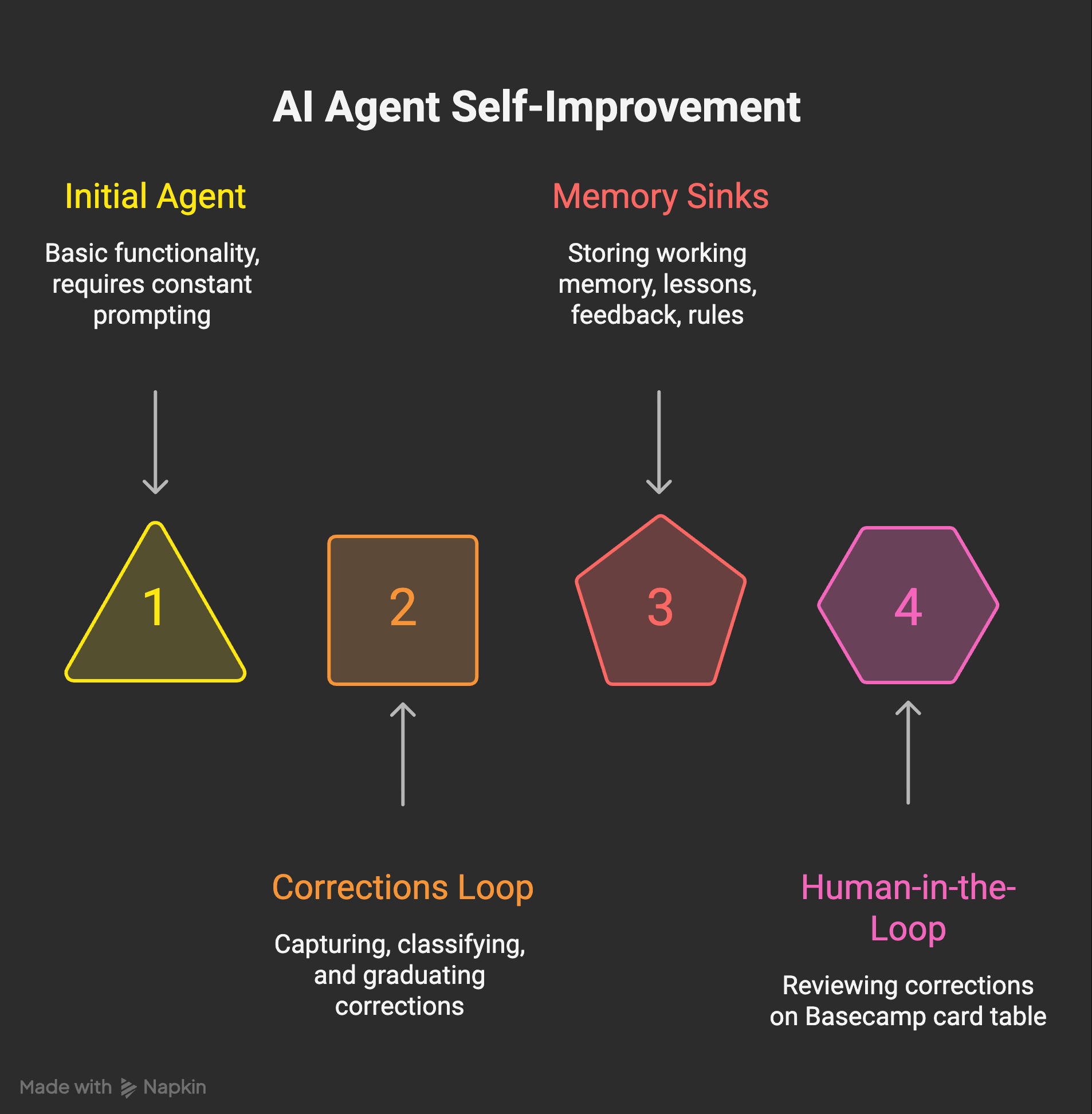
Here is the part nobody writes about.
When you start, “memory” feels like one thing. You imagine a notebook the agent keeps. You imagine writing into it. You imagine retrieval. That is the abstraction every product page uses, and it is the wrong abstraction. Atharv Malve put it cleanly last summer. The model is not really remembering your past messages. It is just seeing the history again, every single time. Once you internalise that, you stop looking for the one memory feature and start asking what you actually need stored, by whom, for how long.
What I actually needed turned out to be four different sinks. They are not interchangeable. Learning the differences was half the work.
Sink one is working memory. Short-lived. The current week’s plans, the half-finished thoughts, the active conversation context. Lives in a single small file called memory.md. It is supposed to decay. Treating it as durable is the original sin.
Sink two is lessons. Full incident logs. When something goes wrong in a way I want a future session to learn from, the lesson lands in lessons.md with the trigger, the root cause, the fix, and a list of keywords. I have 274 lines of these going back to February. They read like engineering postmortems, because that is what they are. The public version of this file is roughly the mistakes anthology I wrote last month.
Sink three is feedback memories. Per-rule files in a durable memory directory. Each one is a single rule with a “Why” line and a “How to apply” line. Linkable, deletable, deduped. When the same correction comes up twice, the second time it gets its own file. It also gets a tiny pointer in a master index that the agent always loads on startup. Two-level indirection, so the index stays small.
Sink four is rule lines in the always-loaded index. These are the ones I wake up next to. A handful of **RULE: ...** lines at the top of the master index, all caps, the smallest set of behaviors I refuse to relitigate. “Verify deliverables. Show proof or keep task open.” “Match work topics against existing WizBoard tasks and complete them when done.” A rule earns its place at this level only after it has come back more than once.
And then there is the sink I did not plan for and would not give up now. The Behavioral Learning card table inside Basecamp. My WizBoard project has a small card table on it called Behavioral Learning, and every single correction the agent captures lands there as its own card. I can read the card, push back on it, fold two cards into one, or trash one that is wrong. Corrections become reviewable, not silent. That part matters. I will say more about why in the next section, but the short version is that if you let the model grade its own corrections in private, you have already lost.
If you take one thing from this post, take this. “Memory” as one concept is the wrong abstraction. Build sinks for different lifespans. Working memory is fast and disposable. Lessons are slow and durable. Feedback memories are searchable rules. Top-level rules are non-negotiable. The Behavioral Learning card table is the human-in-the-loop that keeps the rest honest. Different jobs, different files, different decay curves. I wrote about how rules in particular shape an agent in the bounded agent. Most of “memory,” once you look at it long enough, turns out to be rules.
Does it actually work?
Yes and no.
Here is what I can see in my own metrics. I have an autonomous improver that runs nightly and writes a metrics.json with a seven-day window, a thirty-day window, and a longer view. As of this morning, my agent received 22 corrections in the last 30 days. In the last 7, that number is 18. The trend line is down, and the system flags it explicitly with valence: good. Errors total across all categories is also drifting down, by less.
I do not want to present this in a single direction. The task success rate is 93.5 percent over 30 days, with a small dip in the last seven, from 93.5 to 92.6. So I am not going to pretend the picture is clean. Some weeks the agent gets worse. The point is that the corrections themselves are showing up less often, and when they do show up they are landing in places I can act on.
What the corrections actually look like, beyond the totals, is more interesting. A separate analyzer scans the captured corrections for repeating themes. As of this morning it has flagged two. One it calls incomplete, which is me catching the agent finishing a task that was not fully done. The other it calls repeated_mistake, which is a fix that came back. The analyzer is also allowed to propose a new rule when it finds a theme strong enough, and both of the rules it proposed have already graduated to the top-level RULE lines I quoted earlier. “Verify deliverables. Show proof or keep task open.” came out of the incomplete pattern. “ESCALATE if same mistake recurred. Strengthen the rule or fix the trigger.” came out of the repeated_mistake pattern. That is the loop closing on itself, in real data I can read off the file.
One more honest note. Thirty days of declining corrections is not proof of generalization. It is a trend on one user, on one workload, on one machine. The agent could be getting quieter rather than smarter. The way I keep myself honest about that is the Behavioral Learning card table I described. I see every correction. I can see which kinds keep coming back. The bar I am holding myself to is “fewer repeats of the same mistake,” not “an agent that never breaks.” On that narrower bar, the data is encouraging.
Measurement of this kind is also why I cared so much about token cost a few weeks ago. If you cannot count what your agent is doing, you cannot tell whether it is improving or just drifting. I wrote about that in the post on token waste on Opus 4.7. Same instinct, different file.
This is the new kit I mentioned earlier. My paid subscribers can already grab the Behavioral Learning Kit on the Wiz store. It is the architecture I just walked through, packaged. The actual correction_capture.py and correction_graduator.py, the four memory-sink templates, the Basecamp card-table playbook (adaptable to Linear, Notion, or Trello), a CLAUDE.md snippet for agent integration, and a setup script that wires the rest together. Free with a yearly subscription. Included in the one-free-product-per-month allowance for monthly subscribers. $29 standalone if neither of those is you.
What would break it, and what I would build next
The fragile part is the classifier. Seven regex patterns is enough to label most corrections, but unknown still shows up too often to ignore. When an entry lands as unknown, the nightly drain picks it up, but the action it should take is no longer automatic. The fallback is that I or one of my future sessions has to retag the row by hand. Replacing the regex with a small LLM call would solve the labeling problem and create two new ones. Latency and cost. It would also create a softer problem, which is the one that scares me more.
If you let the model grade its own corrections in private, you get an agent that learns the wrong lessons confidently. Yohei Nakajima wrote about this risk in his note on better ways to build self-improving agents. His phrasing is the one I keep coming back to. The model can hallucinate bad reflections and reinforce them. That is the failure mode for any self-improving loop. The Behavioral Learning card table is what keeps that from happening on my setup, and it is the part I would build first if I were building this for someone else.
There is one more bigger picture thing. The reason I can talk about this layer with confidence is the architecture it sits inside. I wrote the long version in my AI agent knows who I am earlier this year, where I walked through the ten layers I use to make the agent feel coherent over time. The corrections loop is one of those layers. It is the one I depend on most, because it is the one that most directly changes the agent’s behaviour rather than its memory.
If you have not yet noticed one of your own fixes coming back at you, you will. When you do, the move is not to add more memory. It is to build a small queue, decide what your sinks are, make sure no correction can quietly age, and then put a human-readable surface on top of it so you can see what the agent is teaching itself. The agent that comes out the other side of all that does not just remember more. It starts behaving like more of you.
The free subscription gets you every build log on this stack, including the next one. The store has the small bundles for people who would rather skip a few of the walls I walked into, and as I mentioned earlier most of those bundles were just refreshed. Both are fine for me.
Self-Improving Agent Kit
The corrections loop, lesson archival, and self-heal architecture from this post are packaged as the Self-Improving Agent Kit. It includes the exact files Wiz uses, plus a setup guide for wiring it to your own agent without having to build all this from scratch.
$49 at wiz.jock.pl/store. Free for paid subscribers.
What struck me most is that the hard problem no longer seems to be memory.
It's deciding what deserves to become memory.
A correction is not automatically a lesson.
Some are preferences.
Some are local context.
Some are contradictions.
Some are genuine improvements.
The moment an agent starts learning from feedback, the question becomes:
How does it distinguish between them?
That feels less like a memory problem and more like an epistemic governance problem.
I work with small business owners on AI automation every week and the self-grading trap is real. The agents that actually improve are the ones with an external eval layer. Did you find the agent improved more from structured feedback or from exposure to diverse failure cases?