


Last week I ran local LLMs on my MacBook and iPhone just to see what they could do. Now I’m building a full agent app on top of that experiment. It’s called Familiar, it’s open source, and here’s where it is right now.
Something clicked for me when I was testing Qwen 3.5 9B last week. Not the chat. The tool calling.
I was playing around with a small local model, thinking I’d hit the wall fast, and then I gave it a simple tool: list files in this folder and rename the ones that match this pattern. It worked. Not Claude-level smart. But it worked, and it did it fully offline, on my M1 Pro, without sending anything anywhere.
That’s when I thought: this is actually the thing.
The case for local
Most people who use AI professionally pay for it. I pay for it. Multiple subscriptions, API credits, cloud inference. It adds up fast and the moment you stop paying, the tool stops working.
Beyond cost, there’s the data angle. I’m fine with cloud AI for most things, but there are categories of tasks where I’d rather keep things on my device. Anything touching personal files, local context, private notes. Stuff that shouldn’t leave the machine.
And then there’s the offline scenario. I work on planes sometimes. At places with unreliable internet. Having something that works no matter what is genuinely useful, even if it’s slower and less capable than the cloud version.
Although local models are nowhere near GPT-5.4 or Claude Opus 4.6 yet, they don’t need to be for a lot of tasks. Renaming files, organizing folders, summarizing local documents, running simple automation. A 3-5 billion parameter model can handle that just fine if you design the tools correctly. And the small model options right now are genuinely good: Qwen 3.5 Small (Alibaba released the 0.8B to 9B series in early March 2026, built specifically for edge and mobile), Phi-4-mini from Microsoft at 3.8B. These aren’t research demos. They’re available today.
The hybrid future I’m betting on
Here’s how I think this plays out. Not one or the other. Both.
You have a small, capable model running locally on your device. It handles the personal stuff: file management, local context, quick tasks, things that should stay private. Then when you need real power (complex reasoning, code generation, agentic work that touches the web), you tap into the cloud.
Two years from now I think this is just going to be the default setup. Devices are getting faster, models are getting smaller and better, and the efficiency gains compound. The M1 Pro I’m testing on would have been science fiction hardware ten years ago.
Tool calling is what makes this viable. A small model that knows what tools it has available and can reliably pick the right one is already useful. The model doesn’t need to be smart about everything. It needs to be smart about what to do next. That’s a much more achievable bar. And tool calling support has matured fast: Qwen 3, Phi-4, Mistral all support it natively now. The infrastructure exists. You just have to build the tools around it.
Familiar
So I started building an app. It’s called Familiar.
The name fits the theme I’ve been running with here. My AI agent is called Wiz, short for wizard. A familiar is a wizard’s companion. Felt right.
The idea is a macOS app (and eventually iOS) that makes local AI actually usable, not as a chat toy but as an agent that can do things on your machine. The key word is agent. Not just “ask it stuff.” Give it tasks, watch it work.
Here’s what Familiar does right now.
Hardware detection on first launch. The app looks at what you have (RAM, chip, available resources) and recommends the best model for your hardware. Not the most powerful model in existence. The best model you can run without your machine becoming a heater. This removes the friction of “which model do I even download?”
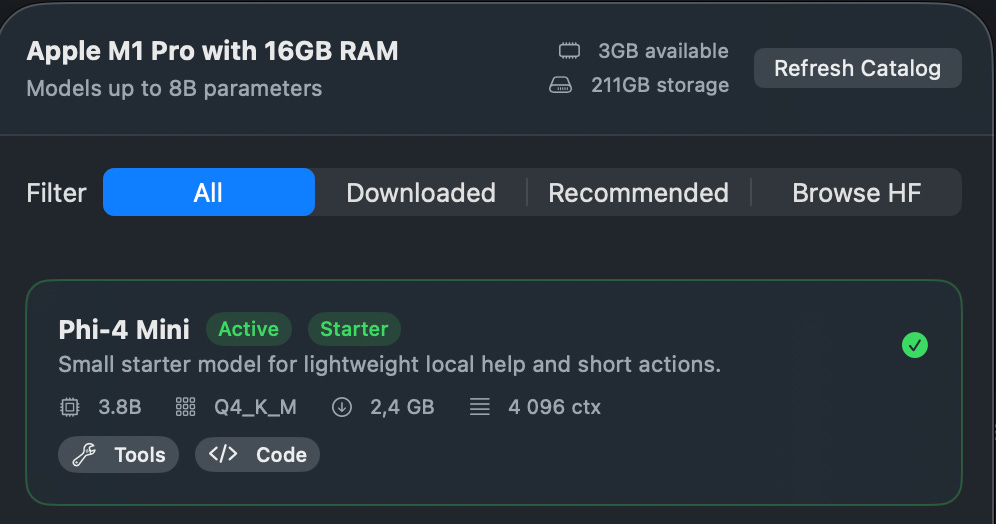
A default model ships with the app. Small enough to run on anything. You’re up and running immediately. No waiting 20 minutes for a download before you even know if you like the thing.
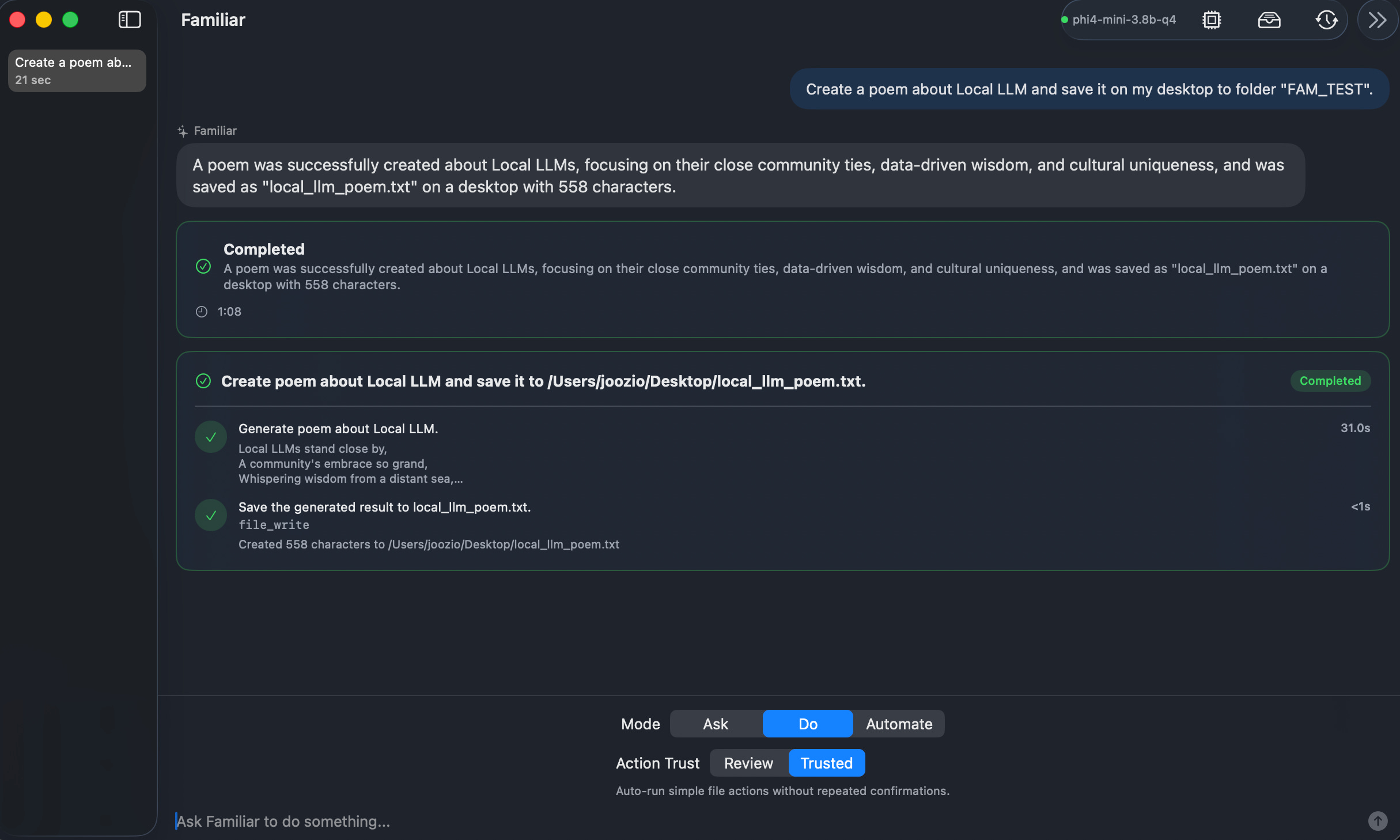
File tools out of the box. Create files, rename them, move them, delete them. Basic stuff, but it works. And it works without the model needing internet access, without API keys, without monthly charges. I have more tools coming (web access when you want it, clipboard tools, shell commands), but this is the foundation.
Night shift mode (in progress). This is the part I’m most excited to build.
My Wiz agent already runs tasks overnight while I sleep. The idea with Familiar is the same concept but fully local: when you close the lid for the night, the app switches to a larger, more capable model that uses more RAM and compute. Because you’re not using the machine, it can push harder. You wake up to work done by a smarter version of the local agent. No cloud, no API bill. Just your hardware working while you rest. I’m working on this now and it’s the feature I think will matter most once it’s done.
Open source and what’s coming
Familiar is open source. That was never a question. The whole point is that you should be able to inspect what’s running on your device, contribute if you want to, fork it for your own needs. I’ll share the GitHub link in the next update as soon as the first public release is ready.
iOS is the other piece. The macOS app is where the real agent work happens, but I want a companion experience on iPhone too. For now that looks like: access to your memory, quick tasks, maybe basic file operations synced through iCloud. The big agentic stuff stays on the Mac (makes sense, more compute available). But having the companion on your phone is useful even if it’s lighter.
Although I’m building this myself, I’m doing it the way I build everything now: with Claude Code and Opus doing the heavy lifting on the implementation. The architecture is mine, the decisions are mine, the code comes from pairing that with AI.
Reality check
I want to be honest about where Familiar is.
It’s not Claude Opus 4.6. It’s not GPT-5.4. A 1 - 9 billion parameter model running on a laptop has hard limits and pretending otherwise would be annoying and wrong. Some tasks will be slower, some outputs will need correction, some things just won’t work as well as the cloud equivalent.
That’s fine. The goal isn’t to replace cloud AI. It’s to have something useful for the category of tasks where local is better: private, offline, no cost. For those cases, Familiar already works, and I can improve it from here.
I’m testing everything on my M1 Pro with 16 GB of RAM. Deliberately not on a Mac Studio or anything exotic. If it works well on a normal laptop that a lot of people have, that’s the right place to optimize.
What I found after the first week: it’s decent. More than decent for file operations and simple task routing. Night shift mode is the thing I want to push hardest in the next phase, because that’s where the “model is bigger than you’d normally use during the day” thing really shows its value.
Why this and why now
I wrote about running local models on my MacBook and iPhone last week, and the response told me something. People want this. Not the nerd-who-compiles-from-source version. The normal-person version where you install an app and it works.
That’s what I’m trying to build. You install Familiar, it figures out your hardware, you have a local agent running in minutes. No terminal commands, no model weights you have to manually manage, no settings that require reading a wiki.
The subscriptions are real money and they add up. Privacy matters more than most people admit. And there’s something satisfying about owning the thing that’s helping you, not just renting access to it.
It is possible. That’s really the thing I wanted to say with this post. Not “local AI will be amazing someday.” It’s working now on a normal machine. It’s limited and it will get better. I’m going to keep building.
More updates coming as the GitHub goes public and iOS moves forward. If you’re curious about what tools I’m adding next or want to follow the build, this is what open source build logs look like on Digital Thoughts, and there will be more of them.
If you want to go deeper on the AI tools and systems I’m building, paid subscribers get access to the full store including the Night Shift Playbook, which documents exactly how I set up my overnight AI workflow. Subscribe here.