


NOTE: Clawdbot had to rebrand, because of Anthropic(meh). First it was Moltbot and now it’s OpenClaw.
So. You’ve heard about Moltbot(Clawdbot before).
Maybe you saw the GitHub explosion—9,000 to 60,000 stars in days. Maybe a friend sent you that TechCrunch piece. Or maybe, like the Moltbot creator I wrote about last week, you’re already running something similar on an old Mac Mini in your closet.
But here’s what most coverage misses: the “what do I actually DO with this?” part.
Because having a 24/7 AI assistant is cool. Having one that actually changes how you work? That’s a different conversation entirely.
I’ve been building my own agent setup—I call it Wiz—for months now. Between my experiments and watching what the Moltbot community is cooking up, I’ve collected use cases that go way beyond the basics.
Let’s get into it.
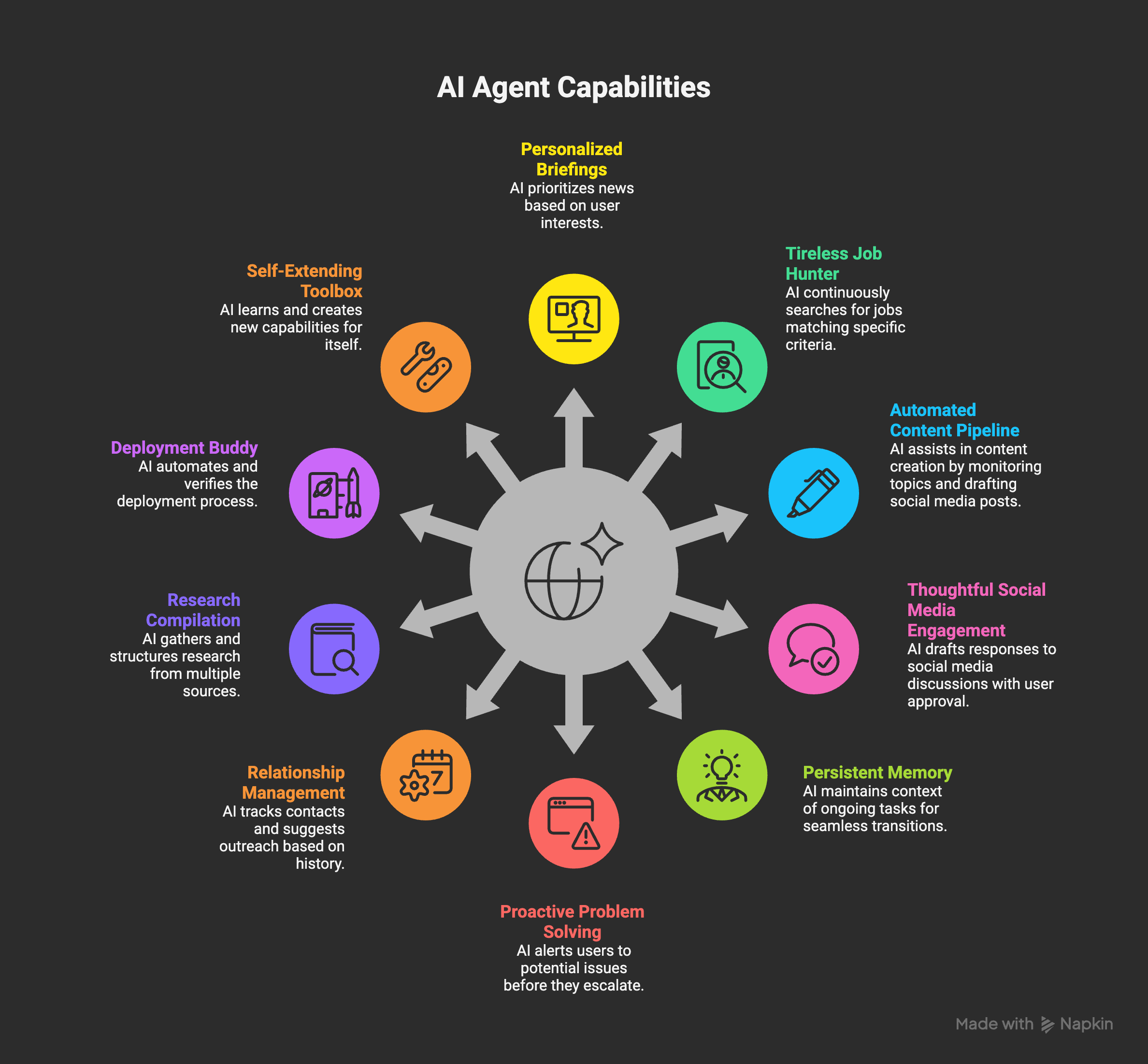
1. The Morning Briefing That Actually Knows You
Every agent tutorial starts with “get your morning news.” Boring.
Here’s where it gets interesting: an agent that’s been watching your patterns can actually prioritize what you see.
My Wiz setup knows I’m building an AI-focused blog, tracking job markets for friends, and managing e-commerce operations. So my morning brief isn’t just “headlines.” It’s:
Substack comments that need responses (with suggested replies)
Job postings matching criteria I set weeks ago
Server health for sites I’m running
Calendar conflicts I haven’t noticed yet
Why this matters: The key isn’t having an AI read your inbox. It’s having one that knows which emails can wait and which ones are actually urgent for you.
2. The Job Hunter That Never Sleeps
This one’s personal. I have two friends with specific job requirements—one in e-commerce, one in creative direction. Running manual job searches daily is a grind.
My setup crawls specific job boards every morning at 6 AM, filters against detailed criteria (remote-friendly, salary range, industry, even “vibes” like company culture), deduplicates against jobs already sent, then emails a digest with only the genuinely new matches.
The kicker? It learns. When someone says “this one’s interesting” vs. “not a fit,” the filtering gets smarter. Over 3 weeks, the hit rate improved from ~20% to ~60%.
3. The Content Pipeline That Writes Itself (Sort Of)
Okay, “writes itself” is an exaggeration. But hear me out.
The boring part of content isn’t writing—it’s remembering what to write about, finding relevant research, and keeping track of what you’ve already covered. This is basically the research problem that made me build a multi-model workflow in the first place.
My blog agent:
Monitors my work sessions for interesting topics
Checks existing posts so I don’t repeat myself
Researches current discourse around potential topics
Drafts social media copy automatically after I approve a post
Do I still write? Absolutely. But I never stare at a blank page wondering “what should I write about next?”
4. The Social Media Responder (That Doesn’t Sound Like a Bot)
Here’s a spicy one. AI agents that engage on social media.
Before you cringe—I’m not talking about spam bots. I’m talking about an agent that:
Finds relevant discussions in your niche
Drafts thoughtful responses based on your actual expertise
Waits for your approval before posting
Keeps track of conversations you’ve started
The magic is in the “waits for approval” part. It’s not autonomous posting—it’s reducing the friction between “I should engage more” and actually doing it.
Real example: My agent found 12 Substack posts about AI agents last week, drafted responses to 8 of them. I approved 5, edited 2, rejected 1. Time saved: ~45 minutes.
5. The “What Was I Working On?” Memory
Context-switching is productivity death. But sometimes you HAVE to step away—meetings, lunch, life.
Agents like Moltbot can watch what you’re doing and maintain running context. When you come back and ask “where was I?”, it doesn’t just show you open tabs. It tells you:
What problem you were solving
What you’d already tried
What the next step probably was
This is huge for people with ADHD (hi) or anyone juggling multiple projects. I wrote more about why persistent memory matters in my original Wiz post.
6. The Proactive Problem Solver
Most chatbots wait for you to ask. Agents reach out first.
My Wiz setup sends me Discord messages when:
A scheduled task failed
Server health looks concerning
An email has been sitting too long
I’ve been away while Claude was mid-conversation
That last one—the “screen handover” feature—if I walk away while my AI is working on something, it DMs me so I don’t lose context. Small thing. Massive quality-of-life improvement.
7. The Relationship Manager
I’m bad at staying in touch with people. There, I said it.
A CRM agent can:
Track when you last contacted someone
Suggest reaching out when it’s been too long
Draft messages that reference your actual history (”Hey, how did that Berlin trip go?”)
Keep notes on what matters to each person
It’s not about automation—it’s about remembering. The agent handles the “when” and “what to mention” so you can focus on actually connecting.
8. The Research Compiler
“Research X” is a common task. But research sprawl is real—you open 47 tabs, forget why you started, and end up with scattered notes everywhere.
An agent-powered research flow:
Takes your question
Searches across multiple sources (I use multiple models for this—different LLMs have different knowledge cutoffs)
Compiles findings into structured formats
Highlights conflicts or gaps
Saves everything to a designated place (Notion, files, wherever)
No more “I know I researched this somewhere” syndrome.
9. The Deployment Buddy
This one’s for the builders. Deploying stuff should be boring, but it rarely is.
My agent knows my infrastructure—DigitalOcean server, what sites live there, how to SSH in safely. When I say “deploy the new mini-app,” it:
Runs the build
Checks for errors
Uploads to the right place
Verifies the site is actually live
Reports back with the URL
Why I don’t use Vercel for this: Control. I wrote about my Claude Code setup and why I prefer having the AI manage my actual server rather than abstracting deployment away.
10. The Self-Extending Toolbox
Here’s the meta one—maybe the most important.
Good agents can create new capabilities for themselves.
I built a “create skill” skill for Wiz. When I find myself doing something repeatedly, the agent can write instructions, set up triggers, and document what it does—essentially teaching itself new tricks.
This means the agent grows with my needs. Instead of being limited to what I set up initially, it evolves.
The Real Pattern Here
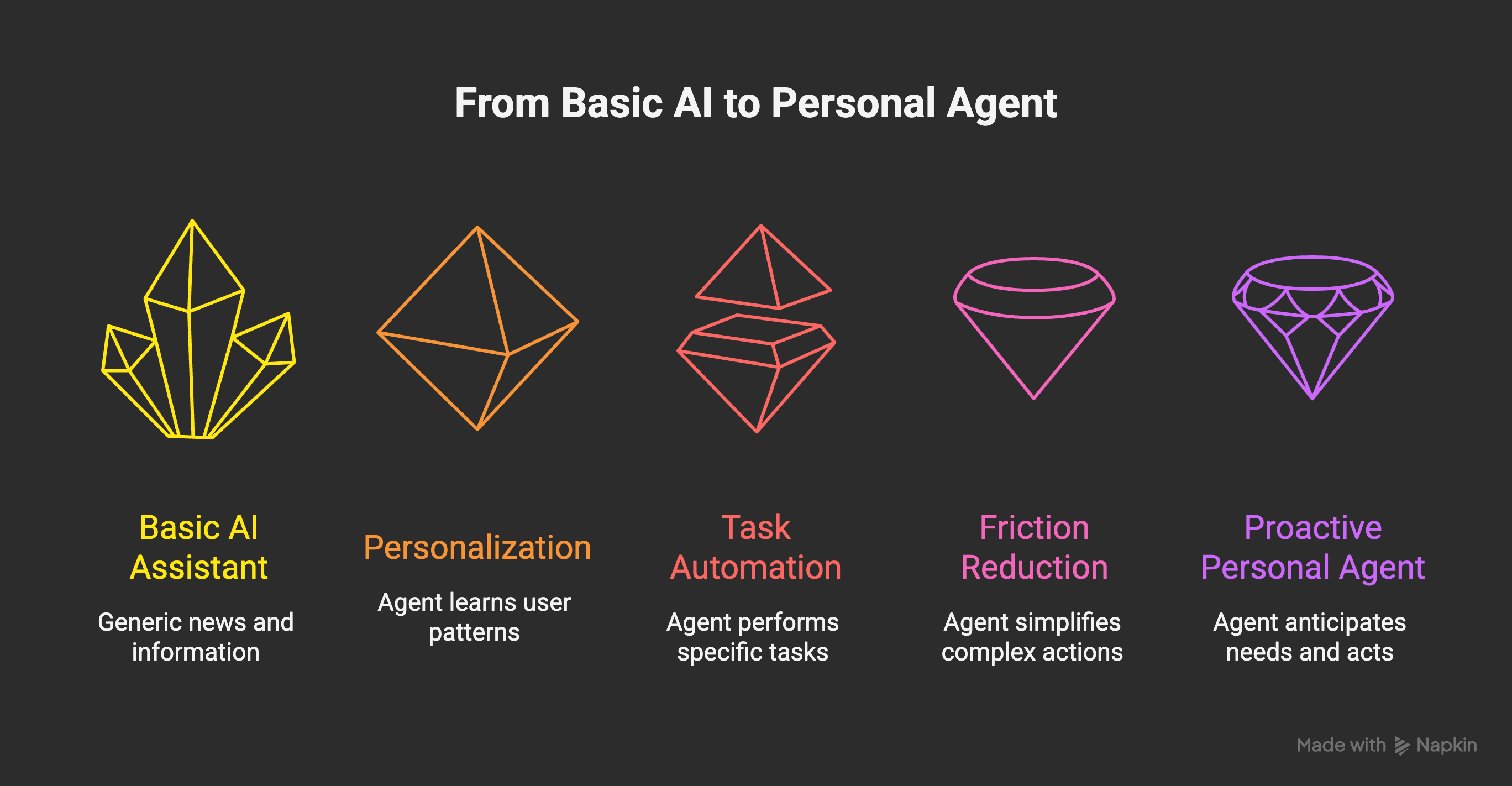
Looking at these use cases, there’s a common thread: friction reduction, not replacement.
None of these replace human judgment. They reduce the activation energy needed to DO things. The difference between “I should respond to that comment” and actually responding. Between “I need to research this” and having usable research.
This is why agentic commerce feels different from “AI recommendations”—it’s not suggesting. It’s doing.
What to Watch Out For
Moltbot exploded because it makes this tangible. But let’s be real about the risks:
Security: Running an AI with full system access is what Steinberger himself calls “spicy.” The Moltbot community has already found prompt injection vulnerabilities. Sandboxing matters.
Credential hygiene: Your agent needs access to things. That means API keys, passwords, OAuth tokens floating around. Have a dedicated “agent credentials” setup. Don’t give it your main accounts.
Cost: API calls add up. I’ve seen people hit $50+ days when their agent goes into research loops. Set hard limits.
Hallucination risk: An agent that sends emails is an agent that can send WRONG emails. Human-in-the-loop approval for anything irreversible.
Getting Started
If you’re curious about building your own:
Moltbot is the fastest path. Open source, 68,000+ GitHub stars, active community. Run it on dedicated hardware, not your main machine.
Claude Code with custom automation is how I built Wiz. More DIY, but more control. I covered the honest pros and cons here.
n8n or similar if you want no-code agent orchestration without the full local setup.
The key is starting small. Pick ONE use case from this list that would actually help you. Build that. Live with it for a week. Then expand.