


(Before we jump in, huge kudos to project I was inspired by: Clawd! Check it out!)
Here’s something that bothered me about every AI tool I’ve used: the moment you close the chat, it forgets you exist.
You start a new session, and suddenly you’re introducing yourself again. Explaining your preferences. Re-establishing context. It’s like having a brilliant colleague who gets amnesia every time they leave the room.
So I decided to fix it. I built my own persistent AI agent. I called it Wiz - short for Wizard. And after a few weeks of living with it, I can tell you: the difference between stateless AI and something that actually knows you is bigger than I expected.
This post is a deep dive into how I built it, the technical decisions that made it work, and what I learned along the way.
If you just want to look what it is - go here: wiz.jock.pl
The Problem: AI Tools Are Great At Tasks, Terrible At Continuity
I’ve written about Claude Code and Claude Cowork. They’re impressive tools. But they share the same fundamental limitation: they’re session-based.
Every conversation starts from zero. The AI doesn’t know what you worked on yesterday. It doesn’t remember your preferences. It can’t build on previous decisions.
For one-off tasks, this is fine. But I wanted something different:
An AI that knows my projects and their current state
Something that remembers what we’ve tried before (and what failed)
A system that can work on things while I’m doing other stuff
Continuity that survives closing the terminal
The only way to get this was to build it myself.
Why Claude Code (And Not Cursor)
I was a Cursor user. Still am, for certain things. It has a polished UI and feels comfortable to work with. But Cursor is designed for one thing: helping you write code inside an IDE.
What I needed was broader. I wanted an agent that could:
Read and write to my Notion databases
Pull data from my calendar
Search the web for research
Process files across my filesystem
Generate blog content and manage a publishing pipeline
Run scheduled tasks without my intervention
Cursor can’t do any of that. It’s a specialized tool for app development, and it’s excellent at that job. But Claude Code operates at a different level - it has full access to your terminal, your filesystem, your network. Once you give it the right permissions, it can do almost anything you can do from the command line.
The CLI interface isn’t for everyone. But for building something like this, it was the only realistic option.
The Architecture: Master Agent + Sub-Agents
The core idea is simple: one master agent that coordinates specialized sub-agents.
Master Agent (Wiz)
├── Loads context on startup (memory, state, user profile)
├── Routes requests to appropriate sub-agents
├── Maintains global state across sessions
│
├── Sub-Agent: Blog Writer
│   ├── Generates post ideas
│   ├── Writes drafts in my voice
│   └── Manages Notion content pipeline
│
├── Sub-Agent: People CRM
│   ├── Tracks relationships
│   └── Flags contacts needing attention
│
└── Sub-Agent: Social Manager
    ├── Creates social media copy
    └── Schedules posts via Typefully
When I talk to Wiz, it figures out which agent should handle the request. If I ask “what should I write about next?”, it routes to the blog writer. If I ask “who haven’t I talked to recently?”, it checks the people CRM.
The key insight: I don’t need to remember which agent does what. Wiz handles the routing behind the scenes. One entry point, multiple capabilities.
The Technical Core: How Memory Actually Works
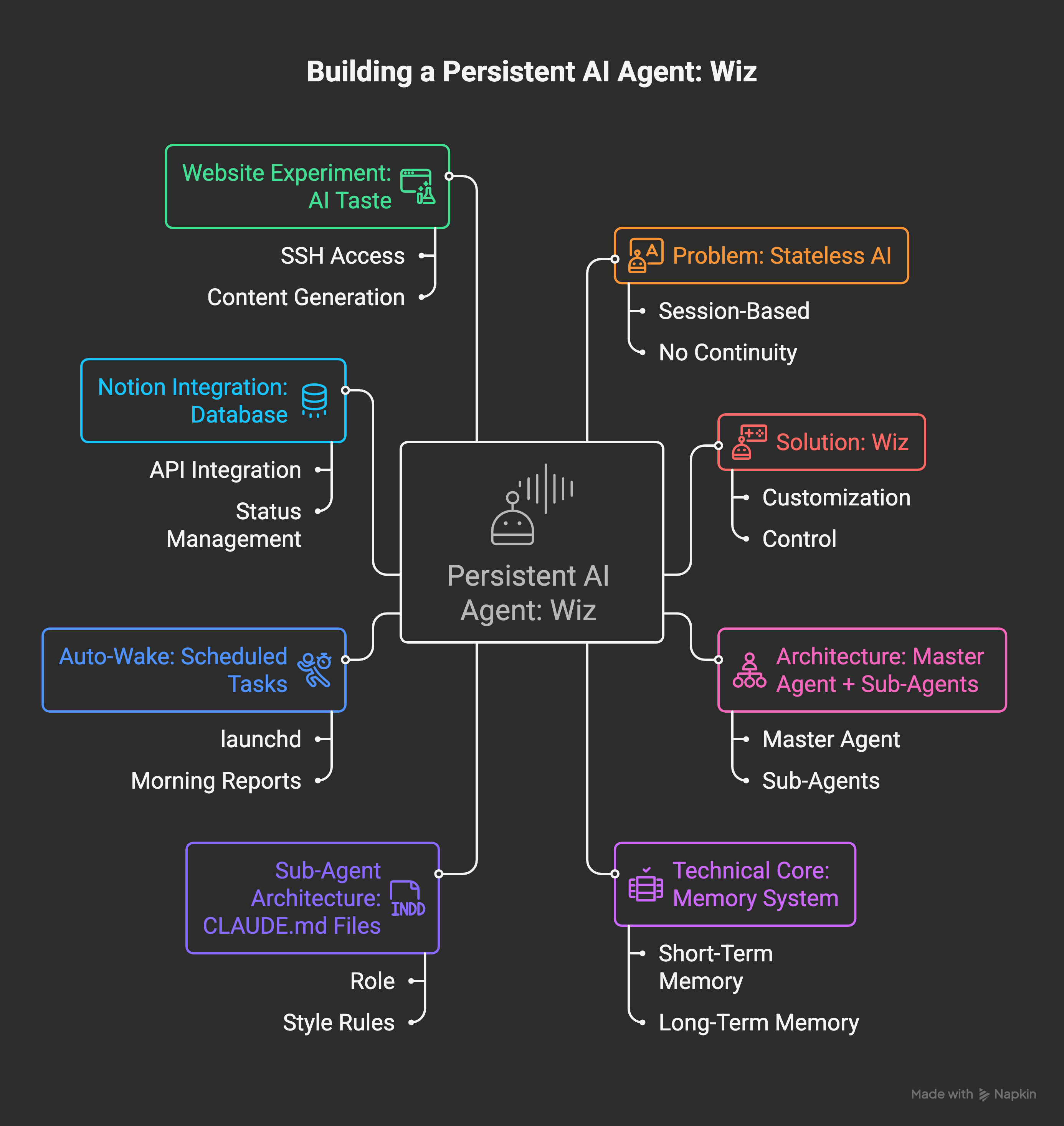
This is where most AI agent projects fail. They either:
Load too much context (expensive, slow, hits token limits)
Load too little context (agent doesn’t know enough to be useful)
I solved this with a two-tier memory system.
Tier 1: Short-Term Memory (~50 lines)
This loads on every session. It contains:
Who I am (basic profile)
What I’m currently working on
Recent session summaries (last 2-3 interactions)
It’s small enough to fit in any prompt without bloating token usage. Think of it as working memory - the essential context that’s always available.
Tier 2: Long-Term Memory (Searchable)
Detailed context lives in separate topic files:
memory-long/
├── topics/
│   ├── digital-thoughts.md    # Blog project details
│   ├── macmillan.md           # Work context
│   └── preferences.md         # How I like things done
├── sessions/
│   └── 2026-01-20.md          # Full session logs
└── index.md                   # Keyword → topic mapping
When I mention something - “how’s the blog going?” - Wiz checks the index, finds the relevant topic file, and loads it. Full context, but only when needed.
The index file is simple keyword mapping:
blog, substack, digital thoughts, newsletter → topics/digital-thoughts.md
notion, tasks, database → topics/notion-setup.md
This approach keeps token usage manageable while maintaining deep context. The Cloth project I took inspiration from would burn through Claude Max subscription limits in a day. Context management isn’t optional when you’re running agents continuously.
Sub-Agent Architecture: CLAUDE.md Files
Each sub-agent has its own instruction file that defines its behavior. Here’s a simplified version of what the blog writer’s CLAUDE.md looks like:
# Blog Writer Agent

## Role
Writing partner for Digital Thoughts (thoughts.jock.pl)

## Style Rules
- Tone: Conversational, energetic, authentic
- Language: Informal, direct reader engagement
- NO EMOJI - Never use emoji

## Post Structure
- Opening: Conversational hook ("So...", "Here's the thing...")
- Body: H3 headers every 200-300 words
- Closing: Decision framework or key takeaway
- ALWAYS END WITH the PS engagement ask

## Workflow
1. Check Notion for "Next" status posts
2. Write full content
3. Set status to "Review"
4. Update memory with topics covered
When the master agent spawns a sub-agent, it passes this instruction file along with the agent’s memory and current state. The sub-agent operates within its defined scope, then returns results to the master.
This isolation matters. Each agent has its own context, its own memory, its own rules. They don’t interfere with each other, and failures are contained.
Auto-Wake: The Agent That Works While You Sleep
Here’s where it gets interesting. Wiz doesn’t just respond when I talk to it - it runs on a schedule.
I use macOS’s launchd to trigger wake-ups:
<plist version="1.0">
<dict>
    <key>Label</key>
    <string>com.wiz.wake</string>
    <key>ProgramArguments</key>
    <array>
        <string>/path/to/wake-master.sh</string>
    </array>
    <key>StartCalendarInterval</key>
    <array>
        <dict>
            <key>Hour</key><integer>7</integer>
            <key>Minute</key><integer>0</integer>
        </dict>
        <dict>
            <key>Hour</key><integer>11</integer>
            <key>Minute</key><integer>0</integer>
        </dict>
    </array>
</dict>
</plist>
The wake script runs Claude Code with a specific prompt:
claude --dangerously-skip-permissions -p "You are Wiz. Check all projects, run pending tasks, report status."
Every morning at 7 AM, Wiz:
Checks my calendar for the day
Reviews project states
Runs any pending automated tasks
Sends me a morning report
The blog writer sub-agent has its own schedule: Mondays and Wednesdays at 9 AM, it generates new post ideas (if the pipeline needs them).
I wake up to work already done. That’s the real value of persistent agents.
Notion Integration: The Agent’s Database
Wiz uses Notion as its primary database. Every project, task, and piece of content lives there.
The integration is straightforward - Notion’s API lets you:
Query databases with filters
Create and update pages
Modify page content (blocks)
For the blog pipeline, I have statuses: Backlog → Next → Review → Done
The blog writer agent queries for “Next” status items, writes the content, then moves them to “Review” for my approval. I handle publishing manually, but everything else is automated.
The key decision: store content in Notion, not in local files. This means I can review and edit from anywhere, and the agent always sees the latest version.
The Website Experiment: When AI Develops Taste
Here’s where things got weird.
I have a DigitalOcean droplet that’s been mostly dormant for two years. One day, I gave Wiz SSH access to it and said: “Make yourself a website. You pick the content. I’ll give feedback on design.”
And it did.
wiz.jock.pl - a page Wiz created about itself. It chose the wizard aesthetic. It wrote the copy explaining what it does. It picked the color scheme (purple and blue, apparently its preference).
I only tweaked the colors slightly. Everything else was its decision.
I don’t quite know how to describe watching that happen. It’s not “cool” exactly. It’s not unsettling either. Maybe... surprising? Like watching something develop preferences.
The technical part was straightforward - Claude Code can SSH into servers, run commands, create files. But the output felt different. It felt like collaboration with something that has opinions.
What I Actually Learned
After weeks of living with a personal agent, here are the lessons that stuck:
1. Token management is everything
Every context window has limits. The agents that work well load only what they need. Short-term memory stays small. Long-term memory is searchable but lazy-loaded. Without this discipline, costs explode and performance degrades.
2. Specialization beats generality
One agent trying to do everything gets confused. Separate agents with focused domains work better. The master coordinates, but real work happens in specialists. This mirrors how human teams work.
3. Instructions need to be explicit
Vague CLAUDE.md files produce inconsistent results. Specific rules produce predictable behavior. “Be helpful” means nothing. “Always end posts with the PS engagement ask” is actionable.
4. Permission boundaries matter
I started with minimal access and expanded slowly. File system access first. Then Notion. Then calendar. Then SSH. Each expansion was deliberate. I’ve never had Wiz do something I didn’t want because I built trust incrementally.
5. The “coworker” metaphor is accurate
It really does feel like delegating to someone who works while you do other things. The relationship shifts from “tool I use” to “collaborator I check in with.” Once you have an agent that knows your preferences and proactively works on your projects, stateless chat feels like a downgrade.
Should You Build Your Own?
Let me be direct: this isn’t for everyone.
Build your own if:
You want deep customization and full control
You’re comfortable with some technical setup (bash, APIs, config files)
You have specific workflows that don’t fit existing tools
You want to understand how agents actually work
Use Claude Cowork or similar if:
You want agent capabilities without the setup
Your needs are general (file organization, document processing)
You don’t want to manage memory, security, integrations
You just need it to work
Both paths are valid. I built Wiz because I wanted to understand what’s possible. Not everyone needs that depth.
What’s Next
The foundation works. Now I’m iterating on the edges:
Morning reports could be smarter about prioritization
The people CRM needs better logic for flagging who needs attention
Blog idea generation sometimes overlaps with past posts (need better deduplication)
But honestly? I’m more interested in what Wiz will become than what it is now. The system learns. The memory accumulates. Every session adds context.
Check out wiz.jock.pl if you’re curious what an AI builds when you let it describe itself.
PS. How do you rate today’s email? Leave a comment or “❤️” if you liked the article - I always value your comments and insights, and it also gives me a better position in the Substack network.
Great! Confrats!
Chciałbym rozumieć chociaż 1/10 z tego tekstu, naprawdę. :D